The invite system worked on the first real pass. The page around it didn’t.
I built Hot Glue’s invite flow with Claude inside MakerWS, and the core security model held up better than I expected. Token creation, validation, expiration, single-use handling, and role assignment all came together fast. The part that burned time was a Next.js hydration bug that made the invite page look unreliable even when the backend logic was correct.
That split was useful. Claude was strong at helping me shape the server-side feature because the rules were explicit. The frontend bug was harder because the app rendered one thing on the server and another in the browser, which meant the code looked fine in isolation but failed at runtime in a way that felt random.
I ended up with two takeaways. First, AI was very effective at building a constrained security feature when I gave it clear rules and made it work inside existing files instead of treating it like a greenfield app. Second, hydration issues in Next.js still need old-fashioned debugging because the real problem is often timing, rendering order, or state initialization, not syntax.
What I needed the invite system to do
The feature was simple on paper. I needed a logged-in workspace owner to invite another user by email. That invite had to create a secure token, expire after a defined period, support role selection, and only be redeemable once. If the recipient already had an account, they should be routed through sign-in and then attached to the workspace. If they didn’t, they should be able to create an account and claim the invite afterward.
I also didn’t want the usual sloppy shortcuts. No plain-text tokens in the database. No trusting client-side state for authorization. No invite acceptance flow that assumes the current session belongs to the email that received the invite.
So the implementation goals were:
- generate a high-entropy invite token
- store only a hashed version of that token
- tie the invite to a workspace, email, and role
- enforce expiration and single use on the server
- handle sign-up and sign-in without losing the invite context
That was the shape I gave Claude. I didn’t ask it to “build an invite system.” I gave it the constraints, the stack, and the files I expected to change.
How I framed the task for Claude
I was working in a Next.js app with server actions and a database layer already in place. Instead of prompting at a high level, I fed Claude the relevant schema, the auth flow, and the current workspace membership model. Then I asked for a patch plan before code.
The prompt structure mattered a lot. I asked Claude to do four things in order: inspect the current membership logic, propose database changes, outline the invite lifecycle, and only then generate code file by file. That prevented the common AI failure mode where it invents abstractions that don’t match the app.
Add a secure workspace invite system to the existing Next.js app. Use the current user, workspace, and membership models. Do not store raw invite tokens. Propose the minimal schema change, list affected files, and describe the lifecycle from invite creation through acceptance. After I approve the plan, generate code incrementally.
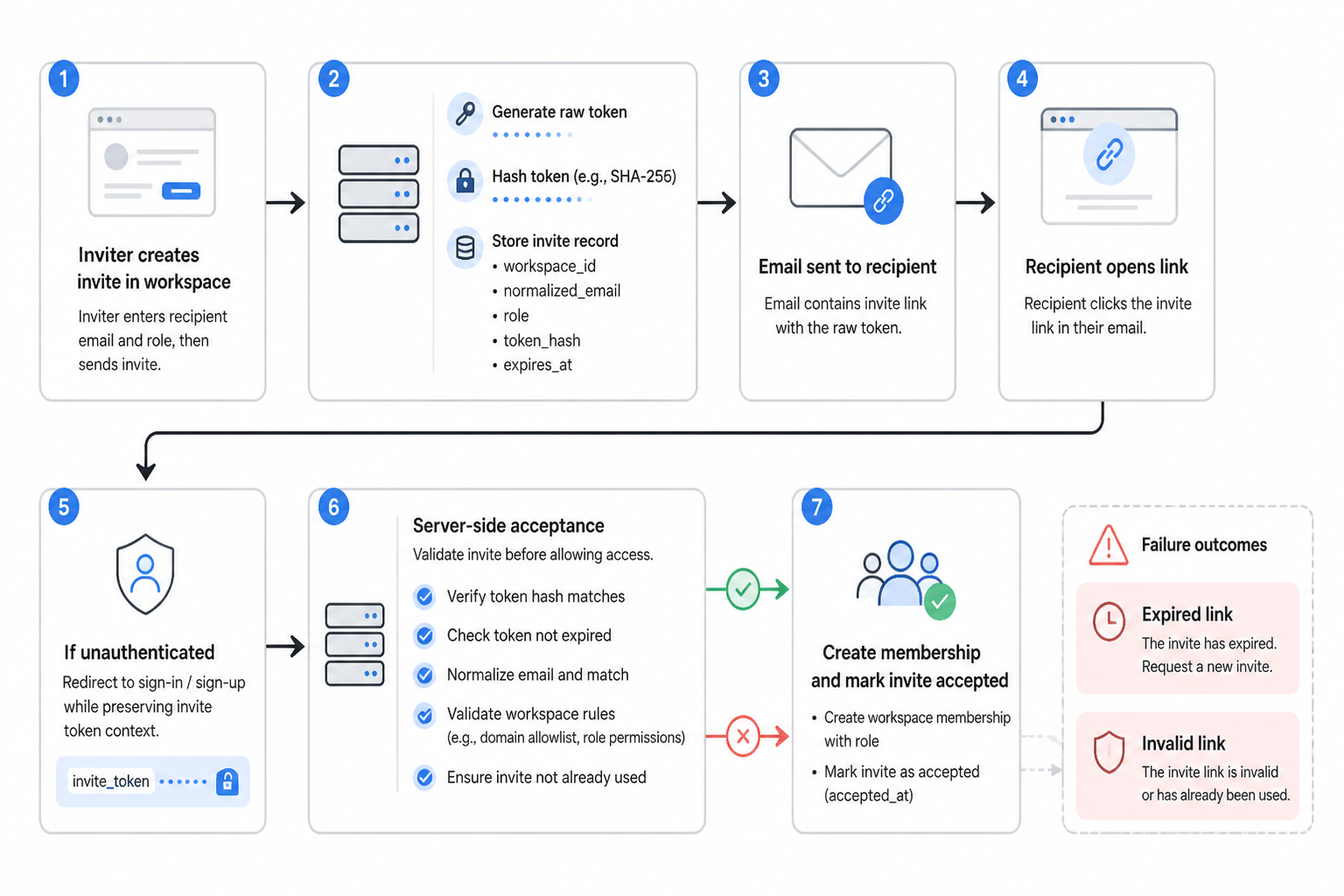
Claude’s first useful output wasn’t code. It was a plan that named the exact moving parts: an invites table, token hashing, an email normalization check, acceptance logic that runs server-side, and a redirect flow for unauthenticated users carrying the invite token as context.
That was a good sign because it was adapting to the project instead of writing a generic tutorial app.
The schema and security decisions
The biggest decision was to treat invite tokens like password reset tokens. The recipient receives the raw token in a link, but the database stores only a hash. If the invites table leaks, the tokens can’t be used directly.
I added fields along these lines to the invites model:
| field | purpose |
| workspace_id | which workspace the invite belongs to |
| normalized recipient email | |
| role | member role to apply on acceptance |
| token_hash | hashed invite token |
| expires_at | hard expiry timestamp |
| accepted_at | single-use enforcement |
I considered storing the raw token with encryption instead of hashing, because it can make support flows easier. I dropped that quickly. There was no reason for the server to ever recover the original token after sending the invite, which means hashing was the cleaner choice.
Claude suggested a random token generated from Node’s crypto module, then hashed with SHA-256 before persistence. That’s not exotic, but it fit the job. The token only needed to be unguessable and easy to compare after hashing.
I also made email matching explicit. The invite is issued to a normalized email address. On acceptance, if a logged-in user’s email doesn’t match the invite email, the server rejects it. That closed an easy hole where someone forwards an invite link and another logged-in user tries to consume it.
What Claude got right in the first pass
This is the part that actually worked well. Once the constraints were clear, Claude was good at producing the boring but important code that usually takes a while to write and cross-check.
It helped me build:
- the invite creation server action
- token hashing and lookup logic
- expiration and accepted-state checks
- membership creation on acceptance
- guardrails to avoid duplicate workspace memberships
The acceptance path was especially solid after a couple of prompt corrections. My first draft prompt let Claude assume that invite acceptance should create a user if one didn’t exist. That mixed auth concerns with membership concerns too early. I changed direction and made the invite flow defer to the existing auth system. If the visitor wasn’t authenticated, the app redirected them to sign in or sign up, then returned them to the acceptance route with the token intact.
That kept the invite logic focused on one job: validate token, verify identity, grant membership, mark invite as used.
The other thing Claude handled well was idempotency. I asked it to assume users double-click buttons, refresh pages, and reopen old links. The resulting server action checked for an existing membership before inserting a new one, and it handled an already-accepted invite without blowing up the whole flow.
Where I had to correct the generated code
Claude still made mistakes, but they were the kind I could catch quickly because the requirements were concrete.
The first issue was authorization scope. In one pass, it generated invite creation code that trusted a workspace ID from the client and only loosely checked whether the current user belonged to that workspace. I tightened that so the server action loaded the workspace membership for the current user and explicitly required an owner or admin role before creating an invite.
The second issue was token comparison placement. An early version fetched invites too broadly and then compared token hashes in application code. That wasn’t terrible for a small app, but it was messy and easier to misuse later. I changed it so lookup was built around the hashed token directly, combined with accepted and expiry checks in the query path.
The third issue was email normalization. Claude remembered to lowercase emails in one function and forgot in another. That’s a classic AI-generated inconsistency. I extracted normalization into one helper and used it in invite creation and acceptance paths. Small fix, important outcome.
The part that looked broken: a Next.js hydration bug
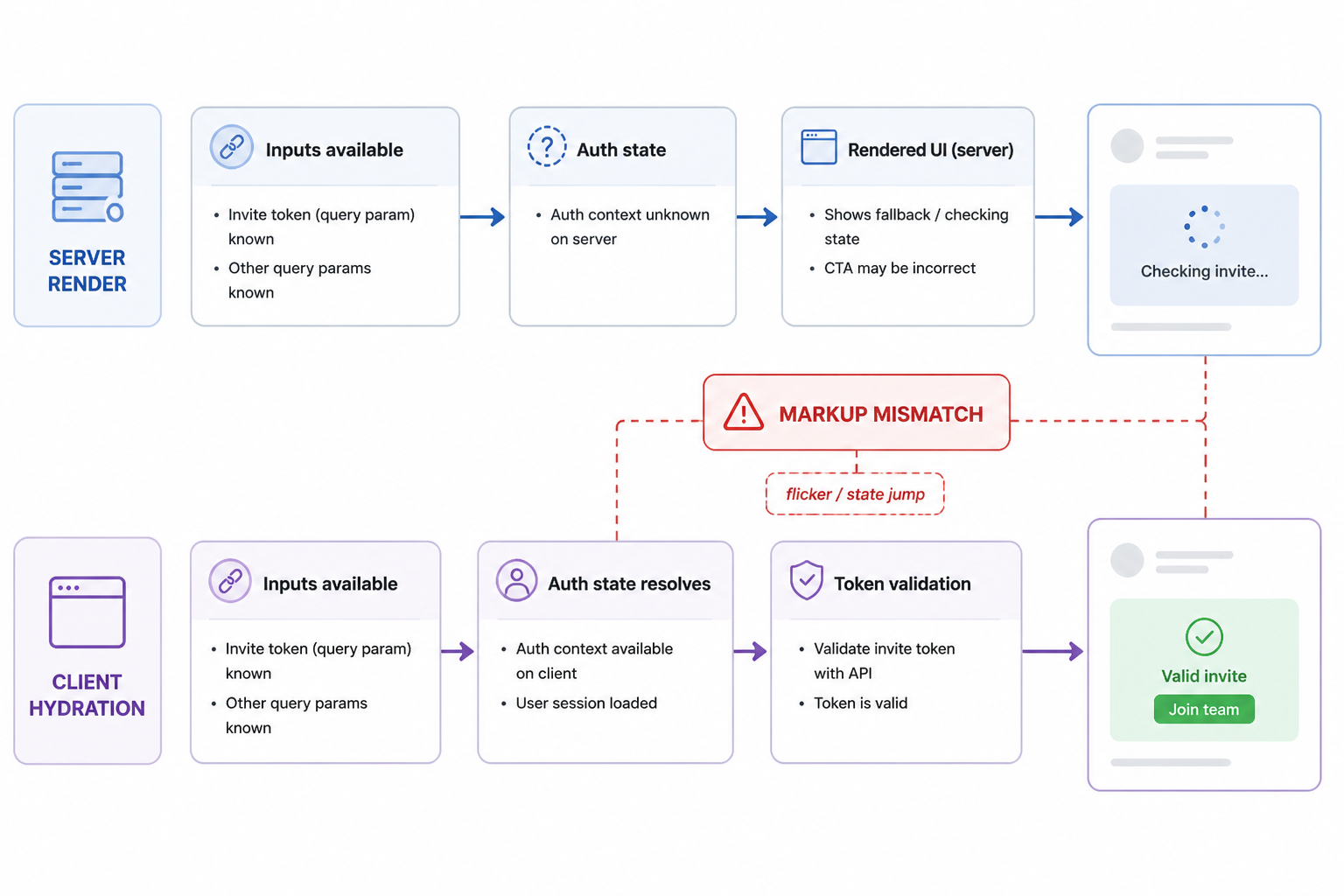
Once the invite logic was in place, I hit the bug that made the whole feature feel flaky. The invite landing page rendered different content on the server and in the browser, so Next.js threw a hydration warning and the page state jumped around during load.
The actual invite token was valid. The backend checks were fine. But the UI was reading auth state and token-derived state in a way that produced one initial render on the server and a different one on the client. That meant users could briefly see the wrong call to action, or the page could flicker from “checking invite” to “invalid invite” to the correct state after hydration finished.
That’s the kind of bug that destroys trust fast. A secure flow doesn’t help much if the page looks broken when someone clicks an invite link.
What caused the hydration mismatch
The problem came from mixing render-time assumptions. Part of the page depended on query params from the invite token. Another part depended on client-only auth state. I had conditional UI that switched between unauthenticated, authenticated, valid token, and invalid token states before the browser had fully initialized the client side auth context.
So on the server, the page rendered with incomplete knowledge. In the browser, once hooks ran and auth state resolved, React tried to hydrate markup that no longer matched what it expected.
This wasn’t Claude’s fault in a simple sense. It was a system-level issue created by the way Next.js renders and hydrates mixed server and client concerns. But Claude also didn’t spot it early because generated code tends to assume state is available when needed unless you make hydration behavior part of the prompt.
The symptom pattern looked like this:
- the invite page loaded with the wrong button or message
- React logged a hydration mismatch warning
- the page corrected itself after client state resolved
- sometimes the token appeared invalid until refresh
How I debugged it
I stopped treating it as an auth bug and started tracing render boundaries. That mattered. At first I wasted time checking token hashing, invite expiry logic, and redirect parameters because those are the obvious failure points in an invite flow. The logs showed the token validation was consistent. The rendering wasn’t.
I broke the page into three questions:
- What does the server know at render time?
- What does the client know only after hydration?
- Which UI branches depend on data from both places?
That surfaced the issue quickly. I had a client component deciding too much during the initial render, based on auth state that wasn’t stable yet. The fix was to move invite validation into a server-backed step and make the first render deterministic.
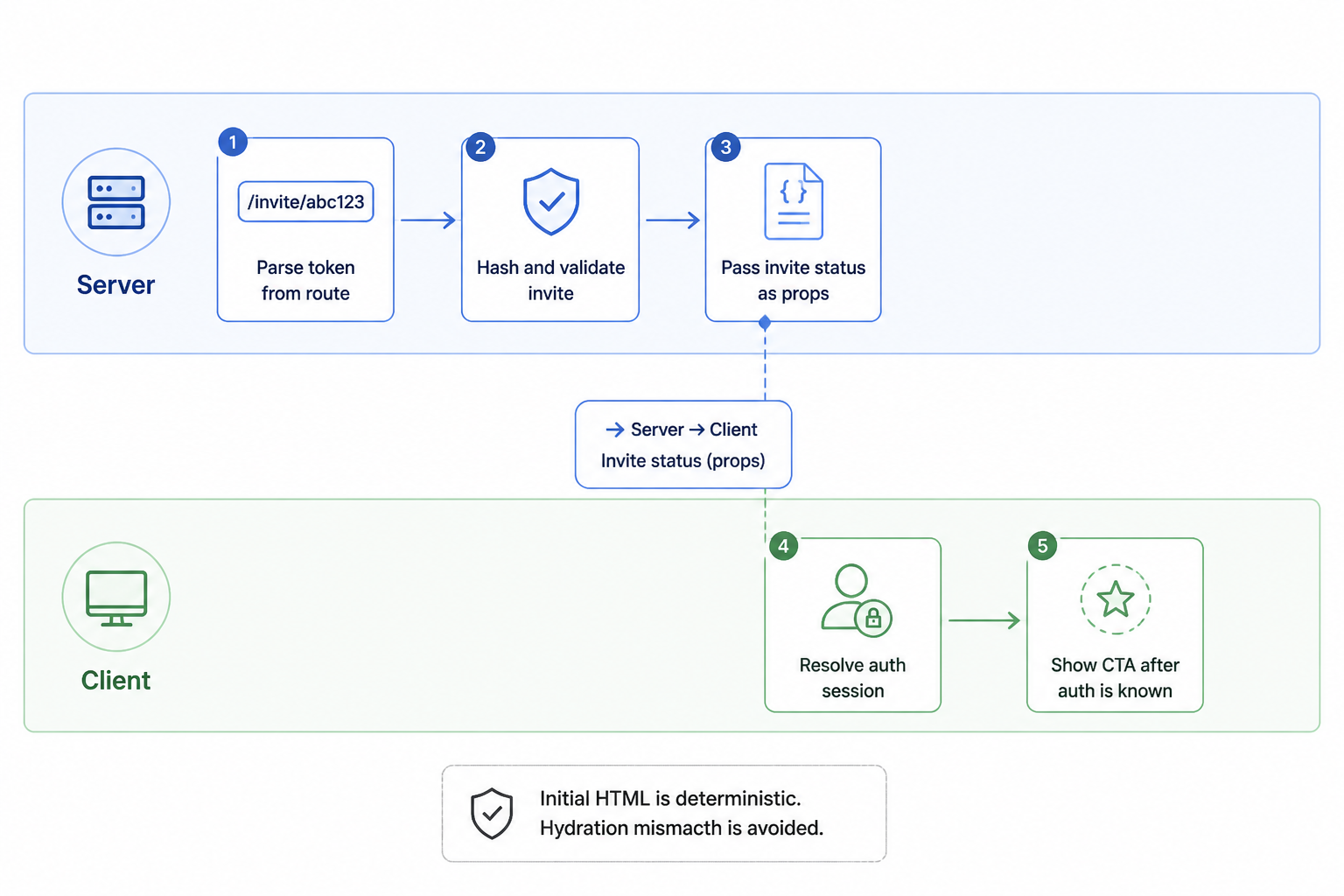
I changed the page so the token was parsed and validated server-side first. The server returned a narrow state object: valid, expired, accepted, or not found, plus the invited email and workspace name when appropriate. Then the client component only handled the next action based on stable props and a clearly initialized auth status.
I also removed any conditional content that depended on browser-only values during the first render. If auth status was still loading, the component rendered a neutral loading state that matched server output instead of trying to guess.
The actual fix
The fix was less dramatic than the debugging process. I split responsibilities harder.
Before the fix, the page tried to do all of this in one place: read the token from the URL, infer whether the invite was valid, check auth state, and decide what action to show. That made it easy for the server render and the client render to diverge.
After the fix, the flow looked like this:
| step | where it runs | reason |
| parse token from route | server | stable first render |
| hash and validate invite | server | security and consistency |
| pass invite status as props | server to client | avoid UI guessing |
| resolve auth session | client | existing auth context |
| show CTA after auth is known | client | no hydration mismatch |
This made the initial HTML deterministic. If the invite was invalid, both server and client agreed. If the invite was valid but auth was unresolved, both server and client agreed on a neutral intermediate state. Once auth loaded, the client could show “Accept invite,” “Sign in to continue,” or “This invite belongs to a different email” without conflicting with the server markup.
What changed in my prompts after that
I changed how I ask Claude for frontend code in Next.js now. I used to describe the user flow and let it choose component boundaries. That works until server rendering and client hydration collide.
Now I tell it upfront which state must be resolved on the server, which state is client-only, and which UI must render identically on both sides during hydration. That’s a much better prompt than asking for “an invite page.”
Assume this route is rendered in Next.js with server and client components. Do not let initial UI depend on client-only auth state if the server output would differ. Keep token validation on the server. Return a deterministic first render and isolate post-hydration UI changes.
That one change cut down a lot of cleanup. Claude still won’t magically understand every edge case in a hybrid rendering model, but it responds well when the rendering contract is explicit.
Trade-offs I kept instead of polishing away
I didn’t try to overdesign the invite system after the first working version. There are more elaborate models I could add later, like invite revocation history, multi-use team links, domain-restricted auto-join, or signed invite metadata embedded in the token. None of that was needed for the current product.
The current version has a few intentional limits.
- invites are single-use, not reusable
- they’re tied to one email address
- acceptance happens through the normal auth flow
- role assignment is fixed at creation time
Those limits reduce weird edge cases. They also make the system easier to reason about when something goes wrong. That’s a fair trade for this stage of Hot Glue.
What was surprisingly effective
The best part of using Claude here was not code generation by itself. It was the ability to iterate on the system design in the same workspace where the code lived. I could show it the current schema, reject broad rewrites, ask for a narrower patch, and then test the result immediately. That worked especially well for backend logic with clear invariants.
It was also good at producing the glue code people often underestimate: input validation, branching around expired invites, duplicate membership checks, and route-level error handling. Those aren’t glamorous, but they make the difference between a feature demo and a usable feature.
The weak spot was anything involving runtime rendering behavior that only shows up in a real browser session. For that, logs, controlled reproduction, and manually simplifying the render tree were still more useful than another round of prompt refinement.
What I’d do earlier next time
I would define the server