The pipeline worked. The content looked finished. The structure underneath was wrong.
I used AI inside MakerWS to build a WordPress article pipeline that could take source material, generate a draft, map it into Gutenberg blocks, attach metadata, and send it into WordPress as a ready-to-review post. It shipped fast. It also shipped with bugs that weren’t obvious until real articles started flowing through it.
The failures weren’t the dramatic kind where the server crashes and everything stops. They were structural. Headings ended up nested wrong. Lists broke into paragraphs. Image placeholders landed in invalid spots. HTML looked plausible but failed editor validation. Articles could be published, but the shape of the content was brittle, inconsistent, and expensive to clean up by hand.
That was the main lesson: AI was good at producing article-shaped output, but not reliably good at producing WordPress-safe structure unless I forced hard constraints at every step.
What I was trying to build
The goal was simple on paper. I wanted a system that could generate a long-form article and hand back Gutenberg-ready HTML blocks, not markdown, not plain text, not a blob that someone had to reformat in the editor.
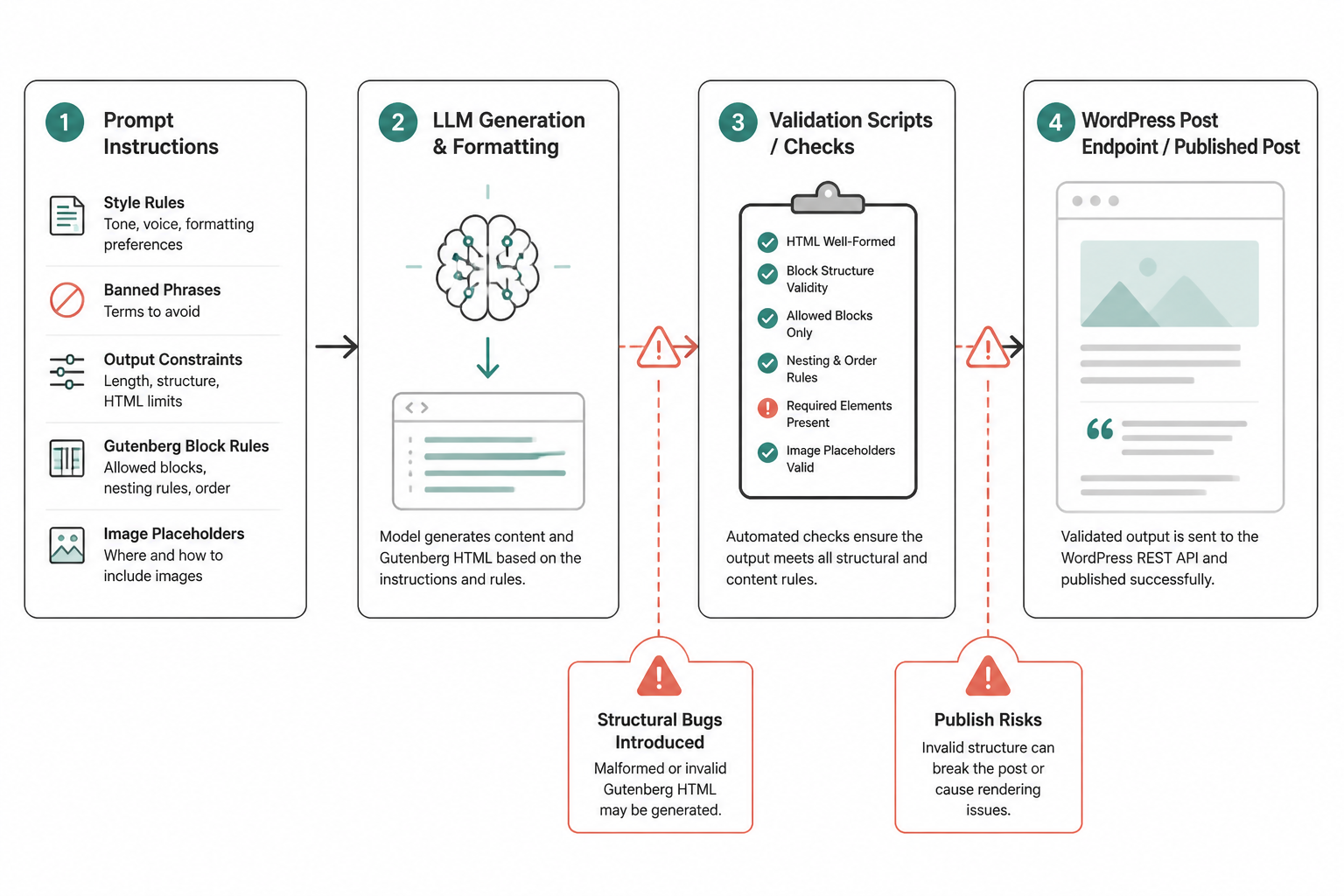
The pipeline took a topic brief, a style script, a few publishing constraints, and article metadata. Then it asked an LLM to produce a full article body using only a small set of allowed blocks: heading, paragraph, list, table, and quote. That output was sent into WordPress through the REST API.
I chose that output format because it looked like the shortest path to usable drafts. If the model could write directly into Gutenberg blocks, I wouldn’t need a second formatting pass. That decision saved time early and caused most of the bugs later.
The stack was plain. MakerWS orchestrated the workflow. The LLM handled article generation and formatting. WordPress stored the post through the standard post endpoint. I added validation scripts between generation and publish, but those came after the first round of failures, not before.
At first, the prompt did most of the work. It carried style rules, banned phrases, output constraints, block rules, and image placeholder instructions. I expected the model to follow that contract tightly because the contract was explicit. It didn’t.
The first version trusted the model too much
The original generation step was one prompt and one output. I passed the full article instructions and asked for Gutenberg-ready HTML blocks only. No markdown. No wrapper elements. No title. Start with the first section. It sounded strict.
In practice, the model would do things like:
- return valid-looking HTML with block comments missing or malformed
- insert unsupported tags inside paragraph blocks
- open a list and never close it
- drop explanatory text outside block markup
- include headings in the wrong order because the article read better that way
Humans could read those drafts and think they were fine. Gutenberg couldn’t always do the same. WordPress would accept some of the content, but the editor then showed block recovery warnings or silently converted parts of the article into generic HTML blocks. That defeated the whole point of the pipeline.
I learned pretty quickly that “looks correct” and “parses safely in Gutenberg” are very different standards.
Bug 1: valid HTML that wasn’t valid block content
This was the most common bug class. The model generated HTML that a browser could render but that didn’t match the block structure WordPress expected. For example, a paragraph block would contain stray line breaks, comment fragments, or nested markup that made no sense in the block parser.
A typical failure looked like a paragraph block followed by plain text outside any block, then another block comment. In the editor, that created invalid block warnings. In some cases, WordPress wrapped the orphaned text in a Classic block. In other cases, it mangled the surrounding structure.
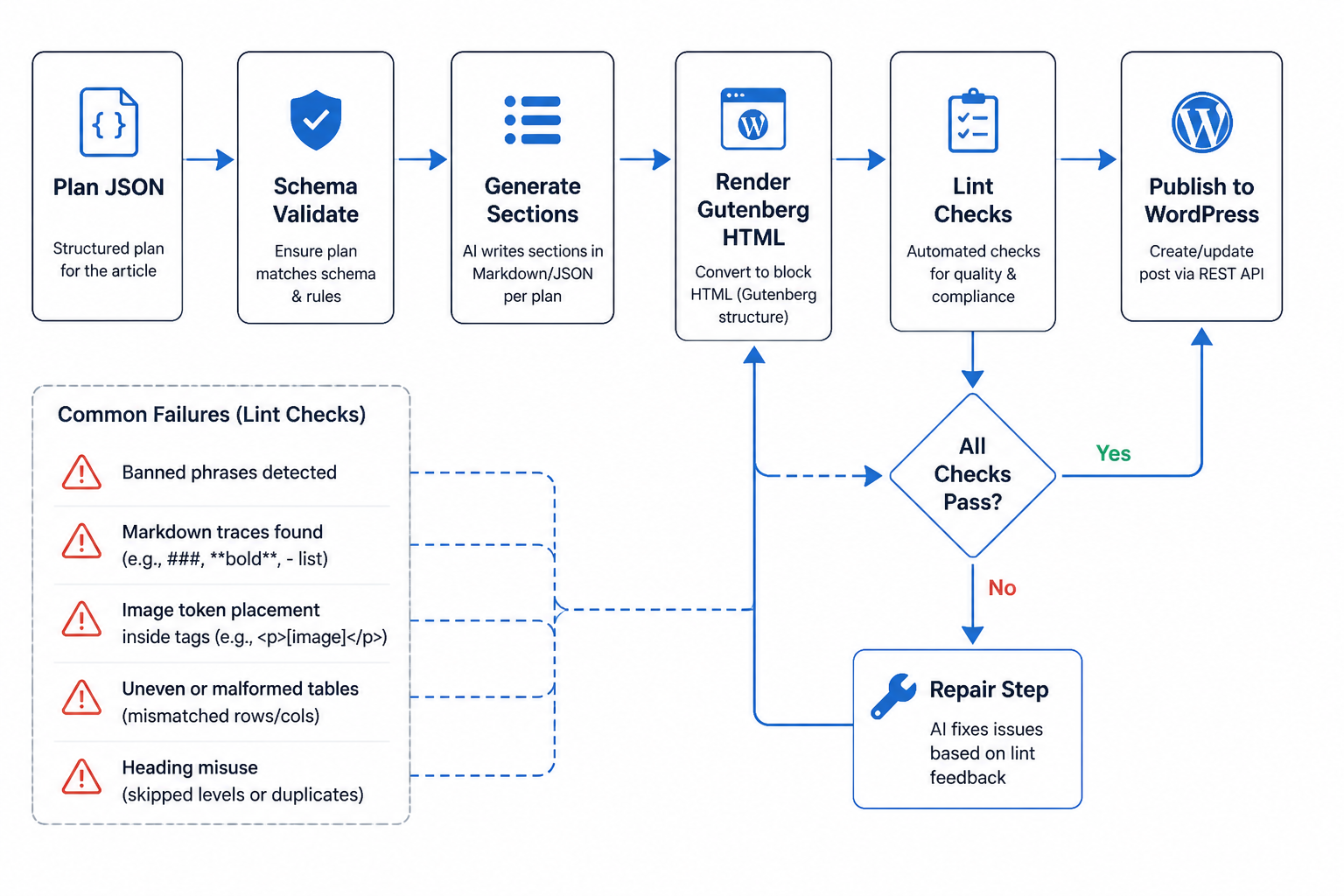
The fix wasn’t “improve the prompt” in a vague way. I split generation from formatting. First I asked the model for a structured article plan in JSON: sections, paragraph counts, optional lists, optional tables, and image slot intent. Then I ran a second step that converted that structure into Gutenberg HTML with deterministic templates.
That changed the system from model-authored markup to model-authored content inside a renderer I controlled. Once I owned the renderer, block syntax stopped drifting.
The important shift was this: I stopped asking the model to write WordPress blocks and started asking it to fill data structures that I could turn into WordPress blocks myself.
Bug 2: heading hierarchy broke the article outline
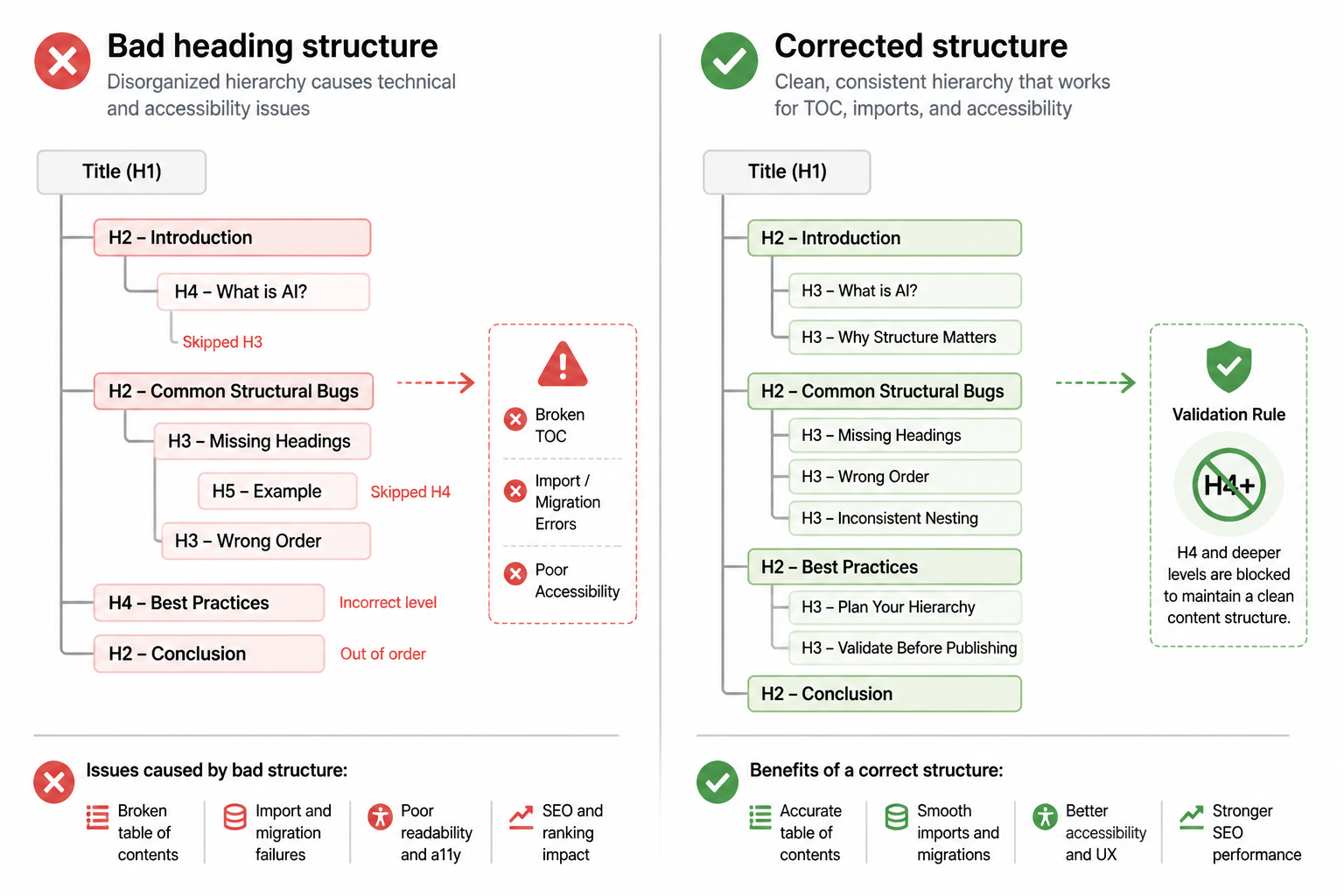
The next issue looked small but had downstream effects. The model often used heading levels based on visual rhythm instead of document structure. It would jump from an h2 to an h4 because the subsection felt minor. Or it would produce an h3 under a paragraph that had no parent h2 at all.
That matters for accessibility, editor consistency, table-of-contents generation, and every downstream parser that assumes a sane hierarchy. It also made article imports unpredictable because some posts ended up with three levels of nesting while others stayed flat.
I fixed this in two places. The planner step could only emit a top-level section and optional subsection. No arbitrary heading depth. Then the renderer mapped those to h2 and h3 only. If the model tried to invent a lower heading level in the content itself, the validation pass caught it and rejected the draft.
This was a trade-off. The articles became slightly less expressive structurally. But they became consistent, which mattered more than nuance in a production pipeline.
Bug 3: lists were where the structure got weird
Lists caused trouble because the model treated them as a stylistic choice, not a structural element with strict boundaries. Sometimes a list item contained a full paragraph block. Sometimes the model wrote introductory text inside the first list item instead of before the list. Sometimes it produced six or seven items even when the instructions capped list length.
That mattered because this site had formatting rules. No bullet lists longer than five items. No unsupported nesting. No random switches between ordered and unordered lists. The model would follow those rules most of the time, which means it would fail often enough to create editing work.
I changed the article planner to mark lists explicitly with a schema like type, intro, items, and max_items. Then the formatter rendered only clean list HTML. If the item count exceeded the allowed number, the validation layer truncated or rejected the section. I don’t love truncating model output, but it’s better than shipping malformed formatting into the CMS.
That was a recurring pattern: if a format rule matters in production, don’t leave it as a sentence in the prompt. Encode it in data and code.
Bug 4: image placeholders landed in invalid positions
I wanted image placeholders inserted as plain tokens on their own line using a strict format. That part of the spec was clear. The model still slipped them inside paragraph tags, under list items, or in the middle of a quote block because semantically it “fit” there.
WordPress didn’t know what to do with those tokens when they were embedded in block content. My later media step, which looked for placeholders and replaced them, also failed because the token wasn’t where the parser expected it.
The fix was to stop letting the model place image tokens directly. The planner emitted image intents attached to section IDs. The renderer inserted the token between blocks only, never inside one. That made the later replacement step deterministic.
I also added a pre-publish check that scanned for any The surprising part wasn't that the model made mistakes. It was where the mistakes clustered. I expected factual drift and weak phrasing. I did get some of that. The more painful issues were structural edge cases that sat between "content problem" and "software bug." For example, one article would pass every obvious visual check but fail because a quote block contained an extra paragraph tag. Another would look perfectly readable in the frontend and then break when an editor opened it in Gutenberg. Another would keep all style rules except one banned phrase repeated in a heading, which then spread into previews and internal search results. Those aren't writing issues in the normal sense. They're serialization issues. The model was generating a document format, not only language. Once I treated the output that way, the fixes got much more concrete. I should've assumed the model was untrusted output from the start. Not malicious, but unreliable in the same way any external system is unreliable. That would've pushed me toward schemas, renderers, validators, and repair loops earlier. I also should've tested with adversarial article shapes instead of only normal ones. The system looked fine on straightforward topics with simple headings and no tables. It failed on pieces with mixed structure, longer section chains, dense quotes, and placeholder insertion. Those should've been in the first test set. The other thing I underestimated was how often the model "helped" by smoothing over constraints. If I said no markdown, it might still produce markdown-like habits in plain HTML. If I said no title, it might create a heading that functioned like a title. If I said output only blocks, it might append a tiny note outside the block markup. Those were not random failures. They were the model trying to complete the pattern of an article as it had seen articles before. After all these fixes, the system became less flexible. That's fine. The article pipeline no longer asks the model to improvise layout or invent structure. It asks for content within a narrow frame. That cuts down on formatting surprises and makes the drafts more predictable to edit. The cost is that some articles feel a bit more templated before human review. I can live with that because the point of this workflow isn't autonomous publishing. It's reliable draft production with low cleanup cost. If I ever want richer article layouts, I won't hand that control back to the model wholesale. I'll add new structured components one at a time, define their schema, and render them myself. If your AI output is headed for a CMS, treat formatting as code. Don't assume prompt wording is enough. Don't trust visually correct output. And don't wait for editors to discover parser bugs manually. The useful boundary is simple: let the model decide what to say, but keep a tight grip on how that gets serialized into publishable structure. That's the part I had to learn by shipping the wrong version first.
What surprised me most
What I should've done from day one
The trade-off I accepted
What I'd tell anyone building the same kind of tool