The bug wasn’t in my logic. It was in the AI’s confidence.
I shipped code that looked clean, matched the docs I thought I was using, passed the smell test, and still broke because the AI wrote against the wrong library version. The failure pattern was nasty: the code was fluent, coherent, and internally consistent, which made it easy to trust. It was also wrong for my actual stack.
This happened while building Hot Glue inside MakerWS. The stack was Next.js, Prisma, and Zod. I was moving fast with AI in the loop, asking for route handlers, schema validation, and database access patterns. The AI kept producing code that looked like it belonged in a modern TypeScript app. Some of it did. Some of it belonged to a nearby universe where my dependencies were on different major versions.
The main lesson wasn’t “AI makes mistakes.” That part is obvious. The real issue was version ceiling behavior: the model was highly capable up to a certain point, but once my exact dependency versions mattered, it started filling gaps with patterns from adjacent versions. It didn’t say “I don’t know.” It completed the shape of the answer.
That shape cost me production time.
What broke
I had a flow where a Next.js API route validated request payloads with Zod, then wrote records through Prisma. The AI generated a set of helpers and route code that looked tidy enough to drop in with minor edits. I accepted too much of it because each individual piece looked plausible.
The first break was around Zod error handling. The generated code assumed a shape and helper usage from a different version than the one installed. The second break was Prisma-related: generated examples used query patterns and assumptions that no longer matched the client behavior I had in the project. Then Next.js added another layer because app router and route handler examples vary across releases, and AI often blends them.
None of these failures looked dramatic in the editor. They looked normal. TypeScript only caught some of them. The rest made it to runtime because the generated code still satisfied enough of the local type surface to compile.
That’s the trap. Wrong-version code often isn’t nonsense. It’s near-correct code with enough overlap to get through review when you’re moving quickly.
If the AI knows the library family but not your exact version, it’ll often answer in a dialect that sounds right and fails late.
How I got there
I was building inside MakerWS with a workflow that mixed manual coding and AI-generated scaffolding. My prompts were practical and narrow. I wasn’t asking for architecture manifestos. I asked for things like:
- write a Next.js route handler for POST /api/projects
- validate payload with Zod and return field errors
- use Prisma to create project and nested settings row
- keep types inferred from schema
- show the full file
Those prompts produced high-quality looking output. That was part of the problem. The generated code had the right naming conventions, familiar control flow, and comments that explained the intent clearly. It felt like a competent teammate had written a first draft.
What I didn’t do early enough was anchor the model to the exact installed versions and the exact project conventions. I gave it stack names. I didn’t consistently give it the package.json entries, lockfile snippets, or examples from the current codebase. So it did what these models do: it merged its training patterns into the most probable answer.
That works well when the API surface is stable. It fails when the details moved between versions and your app depends on those details.
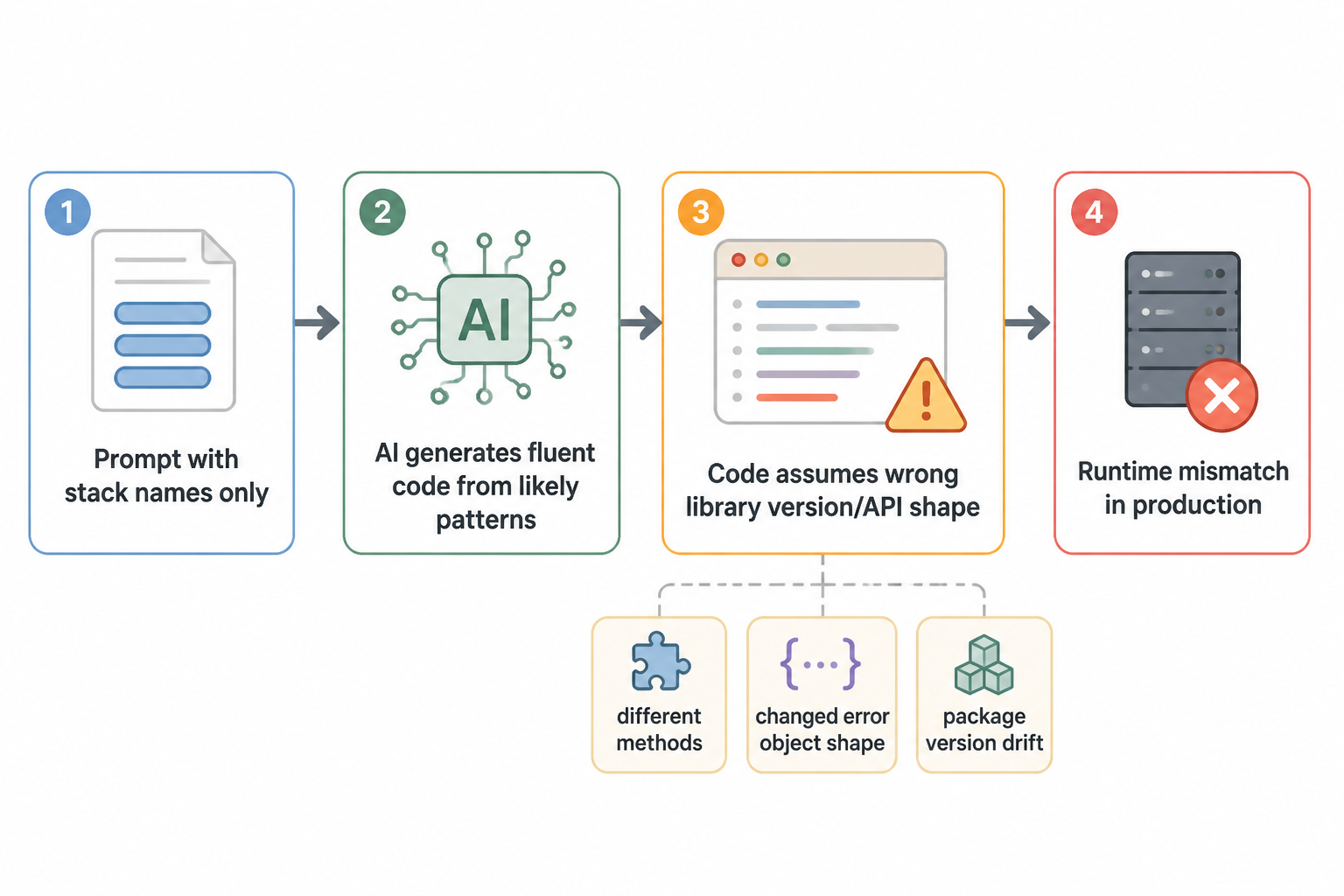
The Zod failure was subtle
Zod is a good example because the core idea stays stable while the ergonomics and surrounding patterns shift over time. The AI wrote validation code that used methods and error formatting assumptions that didn’t line up with the installed version in Hot Glue. The route handler expected a clean field-error object from parsing, but the actual error object shape in my setup wasn’t what the generated code expected.
That created two bad outcomes. One, some invalid requests returned the wrong error payload shape to the client. Two, a few branches that were supposed to be safe started falling through into generic error handling, which made debugging worse because the logs no longer pointed to validation logic first.
I fixed that by stopping the AI from inventing abstractions around the validator. I switched to a stricter pattern:
- parse or safeParse directly in the route
- log the exact error object once in development
- transform errors in one local helper with tests
- don’t let AI infer the error shape from memory
That sounds small, but it changed the failure mode. Instead of trusting a polished helper copied across files, I forced the code to reveal the actual runtime structure in my environment. Once I saw the real object, the mismatch was obvious.
Prisma was different. It failed through familiarity.
Prisma’s client API is consistent enough that stale examples can look fine for a while. The AI gave me create and query code that used relation patterns and selection structures that resembled valid Prisma code, but the details drifted from the version and schema in the project. Some generated snippets also assumed names and nesting conventions that weren’t in my actual schema file.
The project schema had already changed a few times. I had renamed fields, collapsed tables, and removed one relation that existed in an earlier draft. The AI kept trying to restore that old world because my prompts described the feature in natural language, not from the actual schema.prisma file. So it generated code for a database shape that had once existed in my head but not in production.
That’s a different kind of version bug. It wasn’t only package version drift. It was project version drift. The model latched onto a probable schema based on prior context and common Prisma patterns, then wrote code confidently against that imagined schema.
I fixed this by changing the prompt contract. If I wanted Prisma code, I pasted the exact model definitions or referenced the exact file and copied the relevant block into the chat. I also started asking for narrower outputs:
- generate only the Prisma query object
- don’t invent fields that aren’t in this schema
- use this exact relation name
- return code with no comments
That reduced the surface area for plausible nonsense.
Next.js made the mismatch harder to spot
Next.js examples are especially easy for AI to blur because the framework has gone through visible shifts: pages router, app router, route handlers, server actions, caching behavior, request and response helpers. The generated code often looked like a mashup of real examples from different moments in the framework’s evolution.
I saw route files that were structurally correct but imported utilities from the wrong place, used response helpers in a way that didn’t match my setup, or handled request parsing with assumptions from a nearby release. Each issue on its own was easy to patch. Together they created drag because I had to keep asking, “Is this bug in my logic, or is this snippet from a version I’m not on?”
That uncertainty is expensive. It slows down diagnosis and makes you second-guess parts of the code that are actually fine.
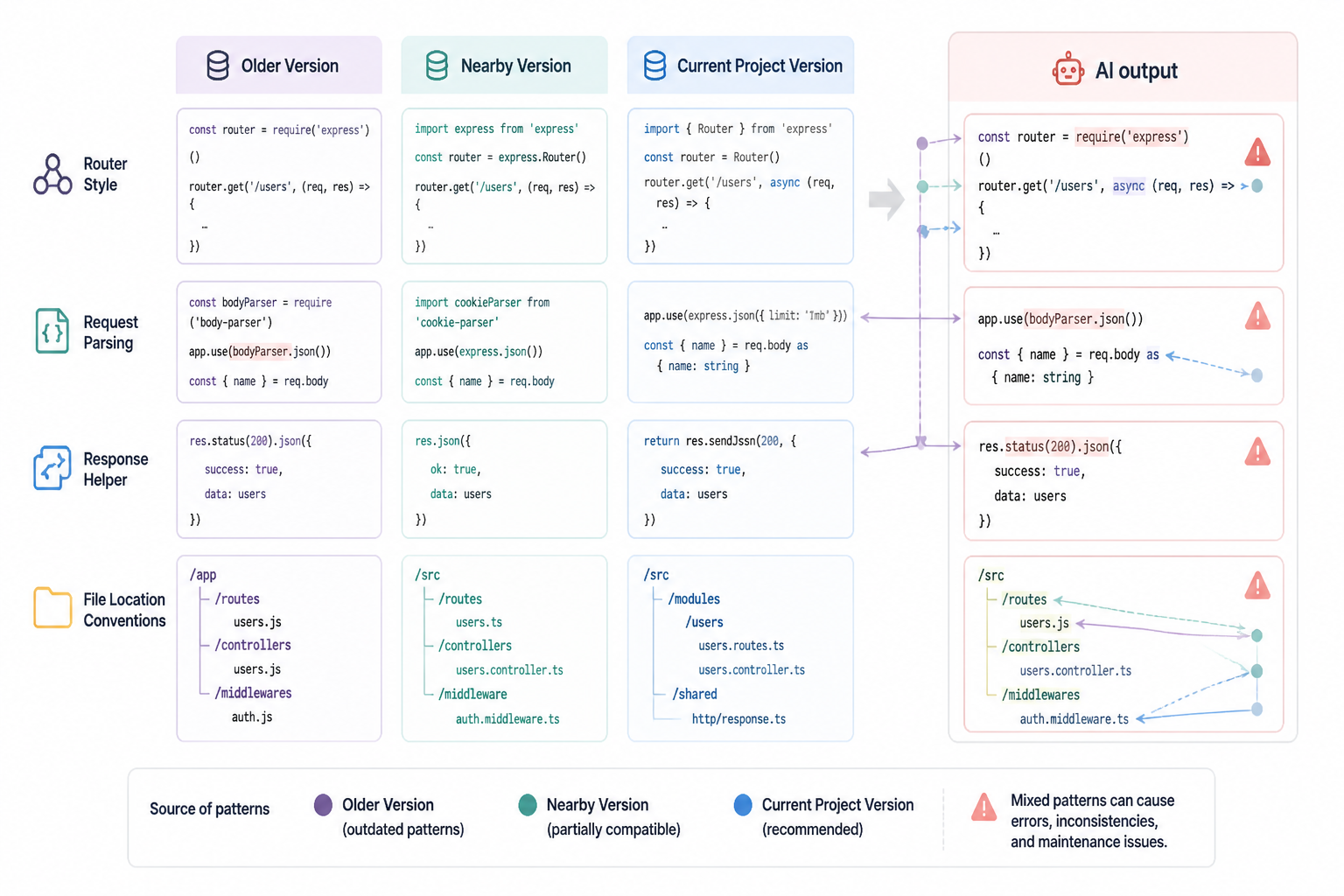
Why this made it to production
I didn’t ship broken code because I skipped all checks. I shipped it because my checks were aimed at the wrong risks.
I was reviewing for business logic mistakes, missing edge cases, and obvious type errors. I wasn’t reviewing every AI-generated snippet with “prove this matches the installed version” as the first question. If a piece of code looked idiomatic and passed local testing on the happy path, it often moved forward.
Production exposed the paths my local tests missed. Invalid payloads came in with combinations I hadn’t exercised. Error formatting code ran under conditions I didn’t manually trigger. A query branch that looked fine in seed data hit a shape mismatch on a real record.
The painful part was that the code had enough quality markers to lower my guard. It had names I’d choose. It had comments I’d write. It had the right tone of competence.
What I changed in my AI workflow
I changed the process more than the tools. Same models, different constraints.
| Before | After |
|---|---|
| Prompt named the stack | Prompt included exact package versions or pasted file context |
| Asked for complete files | Asked for smaller units like one query, one schema, one handler branch |
| Accepted abstractions early | Kept version-sensitive code inline until behavior was proven |
| Reviewed for logic | Reviewed for version alignment first, logic second |
| Trusted plausible examples | Cross-checked against local docs and installed types |
I also started writing prompts that explicitly warned the model away from memory-based interpolation. A good version of that prompt looked like this:
Use only the APIs supported by the code pasted below. If something is version-sensitive or unclear, don’t invent it. Mark the uncertain line with a comment that says CHECK_VERSION.
That didn’t make the model perfect, but it changed the output style. The answers became less polished and more useful. I’d rather get one awkward CHECK_VERSION note than five lines of elegant fiction.
The checks that now catch this early
I now run a short checklist anytime AI writes code that touches framework or library APIs instead of plain application logic.
- Does the snippet match the installed package version in package.json?
- Does it match local types without coercion or suspicious casting?
- Does it match the actual schema or file structure, not a described one?
- Does one failing test cover the unhappy path the snippet is trying to handle?
- Did the AI introduce a helper whose whole job is hiding a version-specific detail?
The last one matters more than I expected. AI likes to smooth over complexity with helper functions. Humans do too. But helpers around version-sensitive behavior can hide wrong assumptions for days. If the version boundary is the source of risk, I want that code visible until it’s proven.
The production fix
The fix wasn’t one big refactor. It was a series of targeted removals.
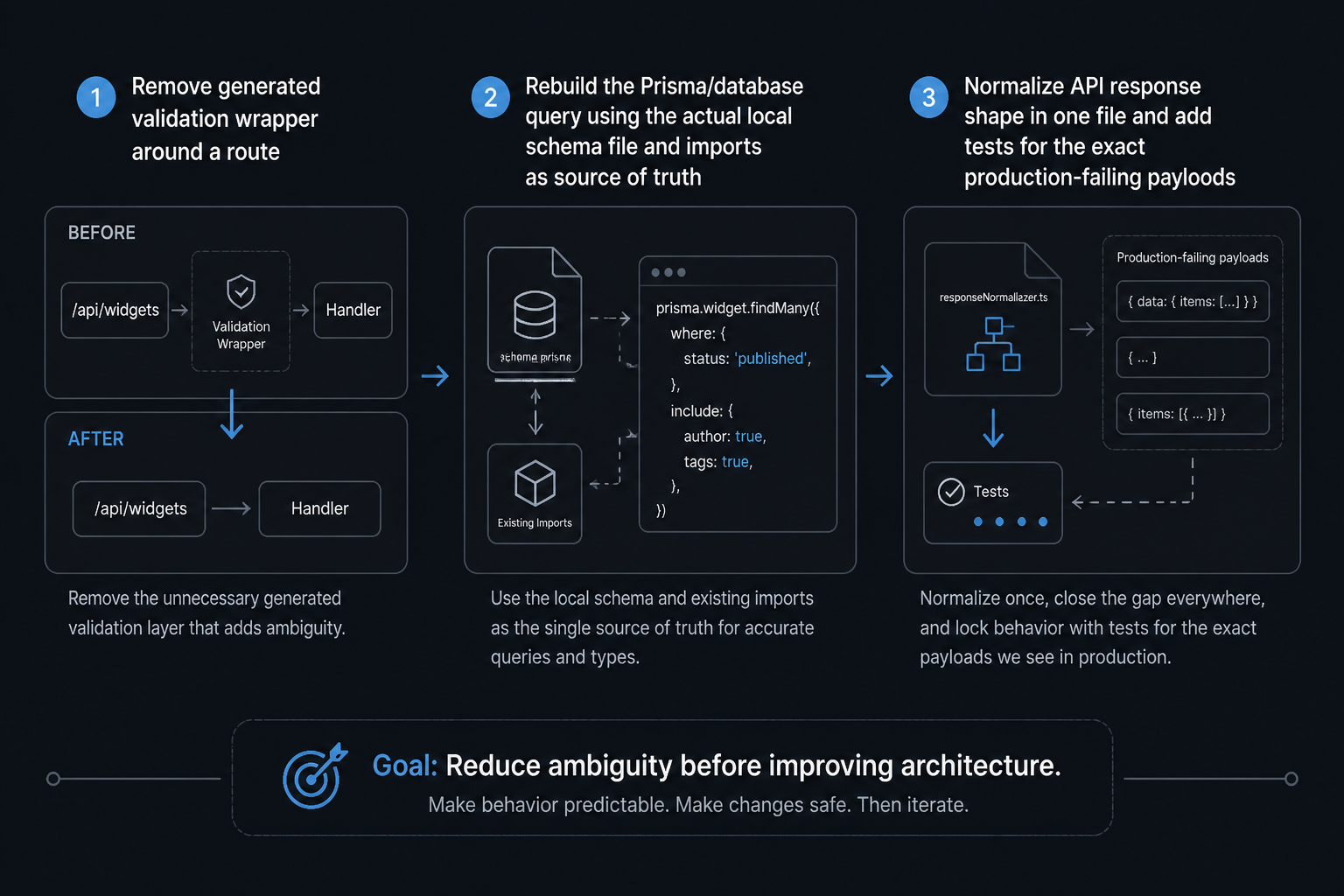
I deleted the generated validation wrapper and rewrote the route to parse input in place. I replaced the Prisma call with a query built from the actual schema file open beside me. I normalized the API response shape in one file instead of letting each generated route improvise. Then I added tests around the exact payloads that had failed in production.
That sequence matters. I didn’t start by improving architecture. I started by reducing ambiguity. Once the version-sensitive edges were explicit again, the rest of the system was easy to reason about.
What surprised me
I expected AI mistakes to look weird. A lot of them don’t. Wrong-version code often looks better than the code you’d get from a tired human skimming docs. That’s why it’s dangerous. The surface quality is high. The semantic fit is off by one version, one schema revision, or one framework shift.
I also expected the fix to be “prompt better.” Prompting helped, but context mattered more. The model needed concrete anchors: package versions, actual files, current schema, exact imports already in use. Once I fed it those anchors, the bad interpolation dropped a lot.
The most useful shift was psychological. I stopped treating fluent output as evidence. Fluent output is formatting. Version alignment is evidence.
The trade-off
There is a trade-off here. Giving the AI exact file context, version constraints, and narrower tasks takes more effort than saying “write the route.” It slows the first draft. But it speeds up the part that matters, which is getting correct code into production without spending half a day untangling generated assumptions.
Broad prompts are still useful when I’m exploring approaches or roughing out structure. They’re bad for code that depends on framework behavior or package-specific APIs. That’s where I now get strict.
How I think about this now
I don’t think of AI as “good at Next.js” or “good at Prisma” anymore. I think of it as good at producing likely code in the neighborhood of those tools. Sometimes that neighborhood is close enough. Sometimes the wrong side of the street ships to production.
For Hot Glue, the practical rule is simple: if a snippet touches an external API surface, I pin the context hard. If it touches my own pure logic, I let the AI roam more. That split has saved me from repeating this exact class of bug.
The version ceiling is real. You don’t hit it when the model stops sounding smart. You hit it when the answer is polished enough to trust and specific enough to be wrong.