The expensive part wasn’t bad code. It was code written for the wrong version.
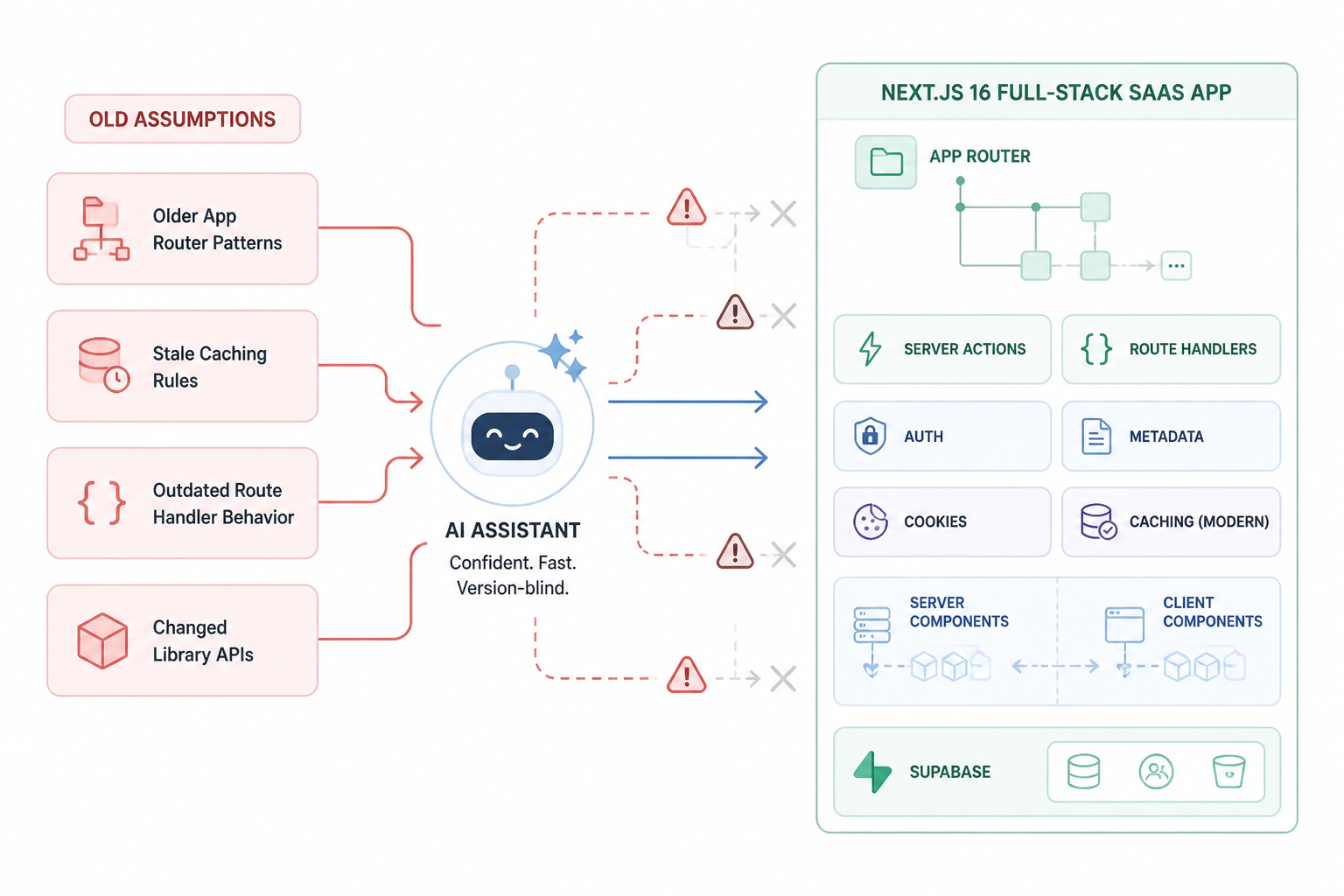
Hot Glue slowed down for a stretch because the AI kept producing plausible code for a stack we weren’t actually running. The app was on Next.js 16. A lot of the generated code behaved like it was written for older App Router patterns, older caching assumptions, older route handler behavior, and in a few spots, libraries that had changed their APIs. None of this failed in an obvious way at first. That’s what made it costly.
I wasn’t fighting syntax errors all day. I was burning time on code that looked right, type-checked well enough, and still pushed the project toward dead ends. The real cost of version-blind AI pair-programming wasn’t that the model made mistakes. It’s that it made mistakes with confidence in places where framework behavior had moved on.
This is what happened while building Hot Glue inside MakerWS, how those failures showed up, and what I changed in the workflow so the AI stopped dragging the app backward.
The setup that triggered the problem
Hot Glue is a full-stack SaaS. The core stack was Next.js 16 with the App Router, TypeScript, server actions where they made sense, route handlers for API-style endpoints, Postgres through Supabase, and a mix of authenticated dashboard pages plus public-facing pages. I was building quickly, often with AI drafting the first pass of files or refactors, then reviewing and running them locally.
That worked well for plain React components, utility functions, simple SQL, and repetitive wiring. It worked much worse when the task sat near framework boundaries. Data fetching, caching, auth flows, route handlers, cookies, redirects, metadata generation, server versus client component placement, and library integration code were the recurring trouble spots.
The pattern was consistent. I’d ask for a feature in natural language, the AI would produce a complete answer, and the answer would contain one or two assumptions from an older version of Next or from a generic full-stack template. Each assumption looked small. Together they created rework.
How version-blind code sneaks in
The first clue was that the generated code often felt slightly off even when it looked polished. File placement would be wrong. Data fetching would happen in a component that should’ve stayed purely presentational. Cache invalidation would be handled with advice that no longer matched the way I wanted the app to behave. A route would work in development and then reveal a flawed assumption as soon as auth or deployment entered the picture.
AI isn’t reading your repo the way a careful teammate would. It’s pattern-matching from training data and whatever context you give it. If your prompt says “build me a settings page in Next.js,” it can easily fill in missing details with patterns from Next 13 or 14, examples from blog posts that are now stale, or generic React habits that fight the App Router model.
The result isn’t nonsense. It’s near-miss code. Near-miss code is dangerous because it survives long enough to waste hours.
What the cost looked like in real work
I can break the cost into four buckets: rework, false debugging trails, architecture drift, and trust erosion.
- Rework meant rewriting files that were structurally wrong even if parts were usable.
- False debugging trails meant chasing environment or auth issues when the root problem was framework-version mismatch.
- Architecture drift meant the app slowly collecting mixed patterns from different eras of Next.js.
- Trust erosion meant I had to read every generated line with suspicion, which removed a lot of the speed benefit.
The time loss wasn’t linear. One wrong answer often caused three more prompts, then a partial fix, then a local patch from me, then a cleanup pass later when I noticed the code no longer matched adjacent parts of the app.
A concrete example: auth code that looked complete and wasn’t
One of the first expensive cases was authenticated dashboard work. I needed middleware-aware auth handling, protected routes, and server-side user context for app pages. The AI generated code that mixed client-side assumptions with server-side checks in a way that technically rendered but made the data flow messy. It also suggested patterns that belonged to older examples of Next auth integration rather than the shape I needed in this repo.
The files looked organized. There was a helper for getting the current user, some route protection logic, and a dashboard layout that tried to enforce auth. But the responsibility boundaries were wrong. Redirect behavior sat in places that made testing harder. Cookie assumptions were brittle. Some code wanted to fetch user state on the client when I needed the initial shell to be decided on the server.
I didn’t throw it away immediately because it was close. That was the trap. I patched it. Then I patched the patch. Then I ended up rewriting the flow so the auth check happened at the right boundary and the rest of the app could assume an authenticated user when it rendered.
The final version was simpler than the AI draft. That’s a recurring theme. Version-blind code often adds ceremony because it tries to cover multiple possible setups at once.
Another one: route handlers with old instincts baked in
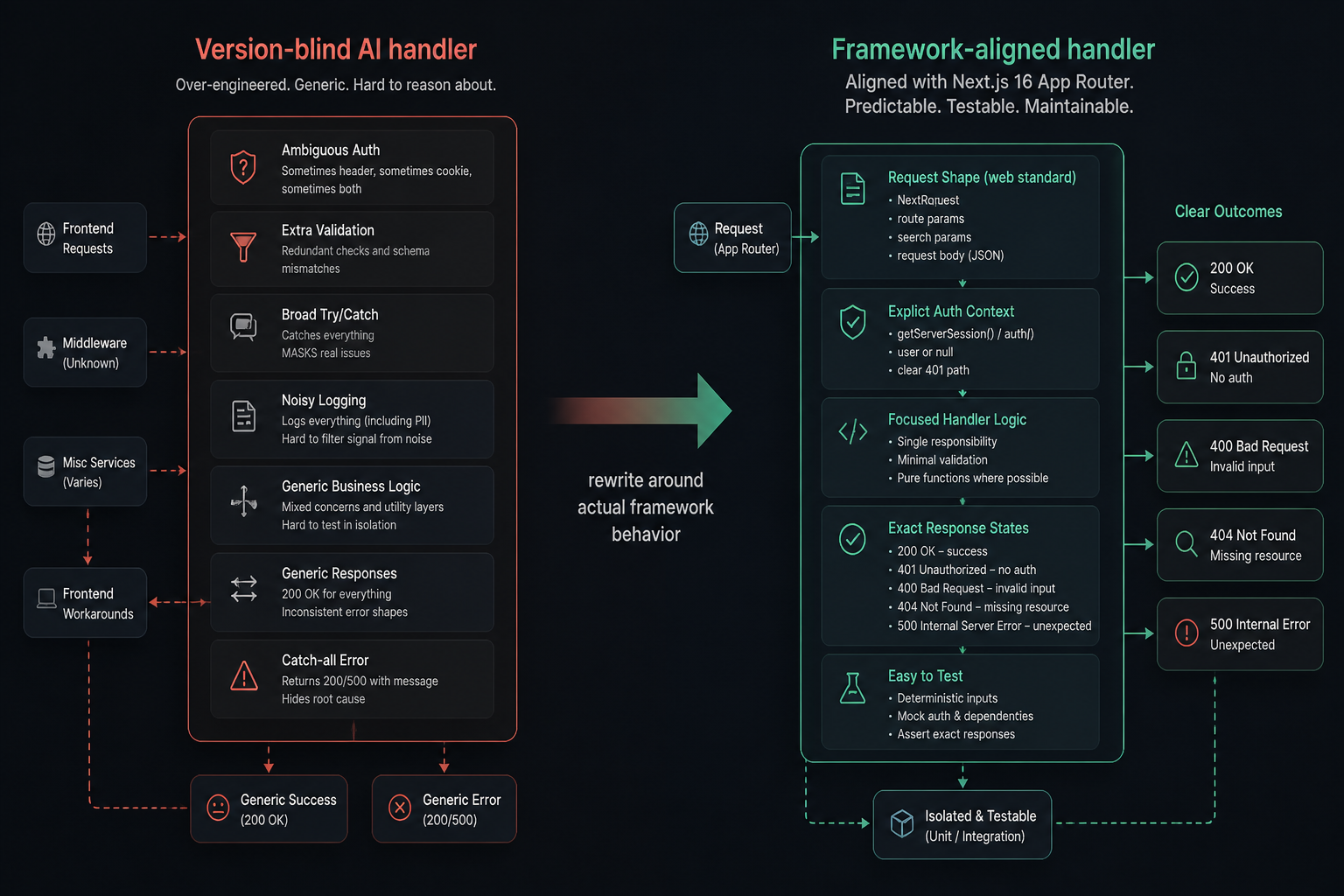
API-style endpoints were another source of drag. I had several route handlers for account actions, billing-related requests, and integrations. The AI often wrote them as if the old mental model of API routes still applied one-to-one. Some of the code wasn’t outright broken, but it carried old assumptions about request parsing, response handling, caching, or file organization.
That matters because route handlers sit at the edge of the app. If they don’t align with the current framework behavior, everything upstream gets harder to reason about. Logs get noisier. Error handling becomes inconsistent. Frontend code starts compensating for backend weirdness that shouldn’t exist.
I saw this in a settings update endpoint where the generated code handled success and failure states in a generic way, but not in the way the rest of the app needed. The AI had produced a broad “safe” structure, which sounds helpful, but broad safe structures often hide framework-specific mistakes. Once I rewrote the route around the actual request shape, the actual auth context, and the exact UI expectations, the handler got shorter and easier to test.
The hidden problem: mixed patterns make the codebase harder to evolve
The biggest long-term cost wasn’t the broken code itself. It was the accumulation of mixed patterns. Some files reflected current App Router-first thinking. Others looked like adapted Pages Router habits. Some pieces assumed the server was the default source of truth. Others pushed state management and fetching into the client because the AI treated that as the safest generic answer.
That kind of inconsistency doesn’t always show up in a single feature. It shows up two weeks later when you need to refactor shared behavior. Then you realize the same problem has been solved three different ways because the AI answered each prompt from a slightly different internal template.
I hit this while standardizing dashboard pages. Early pages had one set of patterns for loading account data and gating access. Later pages, after I improved the prompts, had a cleaner model. Bringing the old pages in line took longer than building some of the new pages from scratch.
Why the model kept doing this
Part of the blame was on the prompts. Early on, I asked for outcomes, not constraints. I wrote requests like “build a billing portal page” or “add an endpoint for updating workspace settings.” That gave the AI too much freedom to fill in missing framework details from memory.
Part of it was context starvation. If the model didn’t see the existing file tree, package versions, and adjacent implementation patterns, it had to infer them. Inference is where old examples sneak in.
Part of it was that some framework changes are subtle. A model can be mostly right and still wrong in the few lines that matter. Those are the most expensive failures because they create convincing code around a bad center.
The prompt changes that reduced the damage
I got better results once I stopped asking for fully solved features in one shot and started pinning the environment hard. The useful prompts became narrower, more local, and much more explicit about version and constraints.
We’re on Next.js 16 App Router with TypeScript. Use existing patterns from these files: app/dashboard/layout.tsx, lib/auth.ts, app/api/account/route.ts. Don’t introduce Pages Router patterns, client-side auth gating, or generic fetch wrappers. Explain any version-sensitive assumptions before writing code.
That one change helped a lot. The model still made mistakes, but it exposed its assumptions more often instead of smuggling them into completed code.
I also started splitting prompts into two phases. First, I asked for a plan constrained to my repo. Then, after I checked the plan, I asked for the code. This caught a lot of outdated instincts before they reached the filesystem.
- Phase 1: inspect the relevant files and propose the smallest change
- Phase 2: list version-sensitive risks
- Phase 3: generate code only for the agreed files
- Phase 4: produce a verification checklist for local testing
That sounds slower, but it saved time because I wasn’t merging speculative architecture into the app anymore.
The repo guardrails that mattered more than the prompts
Prompting helped, but repo guardrails mattered more. I added lightweight friction so outdated code had fewer places to hide.
First, I made sure there were canonical examples inside the codebase. If a route handler, server action, dashboard layout, or auth helper had a clean implementation, I reused it as reference context in future prompts. AI works better when it can imitate your current repo instead of guessing from the internet in its head.
Second, I started keeping version-sensitive notes close to the code. Not long documents. Short comments and local docs that spelled out decisions like “auth is resolved on the server in layouts/pages, not in client wrappers” or “settings updates go through route handlers with this response shape.” Those notes gave the AI less room to invent patterns.
Third, I got stricter about rejecting generated code that introduced abstractions too early. Version-blind code loves helpers. It wants to make a generic utility before the app has earned one. That’s risky because the helper often bakes in stale framework assumptions and then spreads them everywhere.
What I now check before accepting AI-generated Next.js code
| Check | What I look for | Why it matters |
|---|---|---|
| File placement | Is this code living in the right app directory location and boundary? | Wrong placement often signals old router assumptions. |
| Server vs client | Did the model push logic into the client that should stay on the server? | That creates auth, performance, and consistency problems. |
| Data flow | Does fetching happen where this repo already fetches similar data? | Mixed data patterns cause drift fast. |
| Library API shape | Do imported helpers and options match installed versions? | Many failures come from near-correct but outdated API usage. |
| Error and redirect behavior | Does the generated control flow match how the app already handles failures? | Generic examples often conflict with app-level UX and auth rules. |
This review is less about being paranoid and more about checking the places where version mismatch shows up first.
The surprising trade-off: AI stayed useful once I asked it to do less
I didn’t stop using AI for full-stack work. I changed what I asked it to do. The most reliable use wasn’t “build this complete feature.” It was “work inside these constraints and help me modify this exact slice of the system.” That made the model act more like a pair programmer and less like a code generator trying to reconstruct a whole app from fragments.
For Hot Glue, that meant using AI heavily for:
- refactoring repetitive UI code after the architecture was already decided
- writing tests or test cases around existing behavior
- transforming data shapes and utility logic
- drafting SQL migrations for review
- editing existing files with strict boundaries
I became much more careful with AI on tasks that define framework boundaries. That’s where version-blindness costs the most.
What changed in the actual MakerWS build process
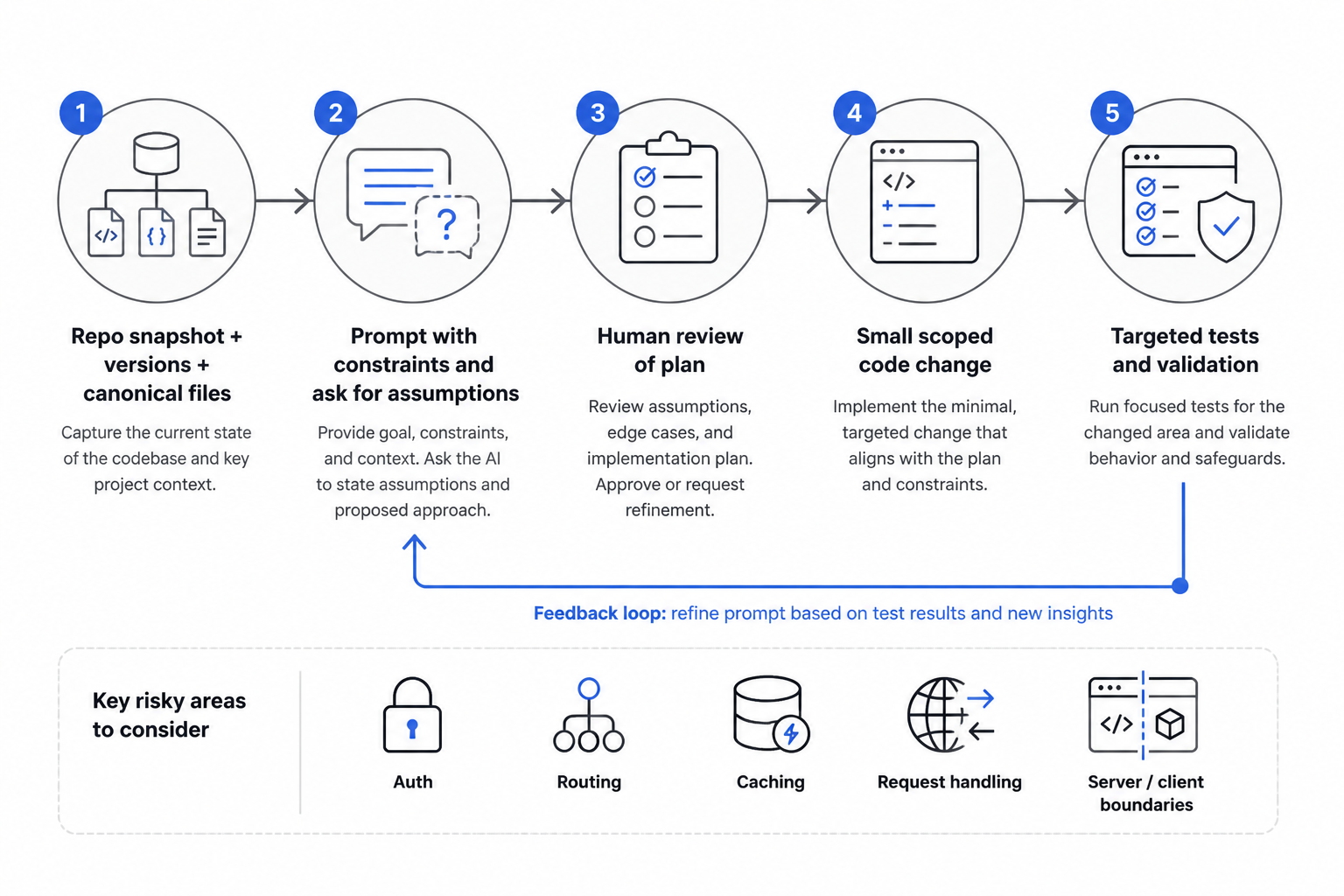
Inside MakerWS, my workflow now starts with a repo snapshot. Before asking for anything substantial, I feed the AI the relevant file tree, package versions, and one or two canonical files from the area I’m editing. I tell it what not to do. I ask it to identify assumptions. Then I review the plan before any code lands.
If the task touches auth, routing, caching, request handling, or server/client boundaries, I force a smaller scope. One file, maybe two. If the AI wants to create a new abstraction, it has to explain why the existing patterns aren’t enough. Most of the time, they are.
I also test generated code in a sequence that catches version-blind failures early. Local render first. Then auth path. Then mutation path. Then refresh and navigation behavior. Then only after that do I clean up naming or structure. Cosmetic polish comes last because it can hide deeper issues if I do it first.
The hindsight that would’ve saved me time
If I were starting Hot Glue again on Next.js 16, I’d treat the framework version as part of every serious prompt, not an optional detail. I’d establish canonical patterns earlier. I’d reject broad generated solutions faster. And I’d assume that any code touching framework edges needs human review even if it compiles and reads cleanly.
The expensive mistakes weren’t dramatic. They were tidy, reasonable-looking, almost-right implementations that nudged the codebase off course. AI didn’t fail because it was useless. It failed because I let it answer from a blurry picture of the stack.
Once I tightened the picture, the output improved. Not perfectly, but enough that the trade started making sense again.
What version-blind code actually costs
It costs more than debugging time. It costs momentum. You think you’re building the feature, but you’re really negotiating with stale assumptions hidden inside plausible code. For a full-stack SaaS, that tax compounds because framework edge decisions affect everything that comes after them.
My rule now is simple. If the code touches a version-sensitive boundary, the AI doesn’t get to freestyle. It has to work from the repo in front of it, with constraints, examples, and a narrow target. That’s how I kept using AI on Hot Glue without letting it quietly rewrite the app into an older framework worldview.
That shift didn’t make the process glamorous. It made it productive. That’s what mattered.