The feature worked. The app around it didn’t.
I had two cases in Hot Glue where AI gave me code that looked correct in isolation and caused problems once it touched the rest of the app. One was a sidebar switcher that let users move between workspaces. The other was a background job runner for long sync tasks. Both features shipped far enough to seem done. Both were wrong in ways that only showed up when I ran them through actual product flows instead of checking whether the generated code compiled.
The pattern was the same in both cases. I asked for a feature. AI filled in the obvious path. It didn’t model the downstream effects. It didn’t think about routing, stale state, interrupted jobs, duplicate execution, user expectations, or what would happen three steps later when another part of the system assumed different behavior.
That wasn’t an AI failure so much as a framing failure on my side. I gave it a local problem, so it returned a local solution. Hot Glue needed system-level changes.
The sidebar switcher looked trivial
I wanted a workspace switcher in the sidebar. Hot Glue has multiple contexts where a user can work with different projects, sources, and automations, so the switcher needed to change the active workspace and update the rest of the UI.
The prompt was roughly: build a sidebar dropdown that lists available workspaces, stores the selected workspace, and updates the app when the selection changes.
AI gave me the expected implementation. It added a selector component, fetched the workspaces, stored the active one in client state, and pushed route changes where needed. If I tested the component by itself, it was fine. The menu opened. The selected item changed. The visible label updated.
That was the trap.
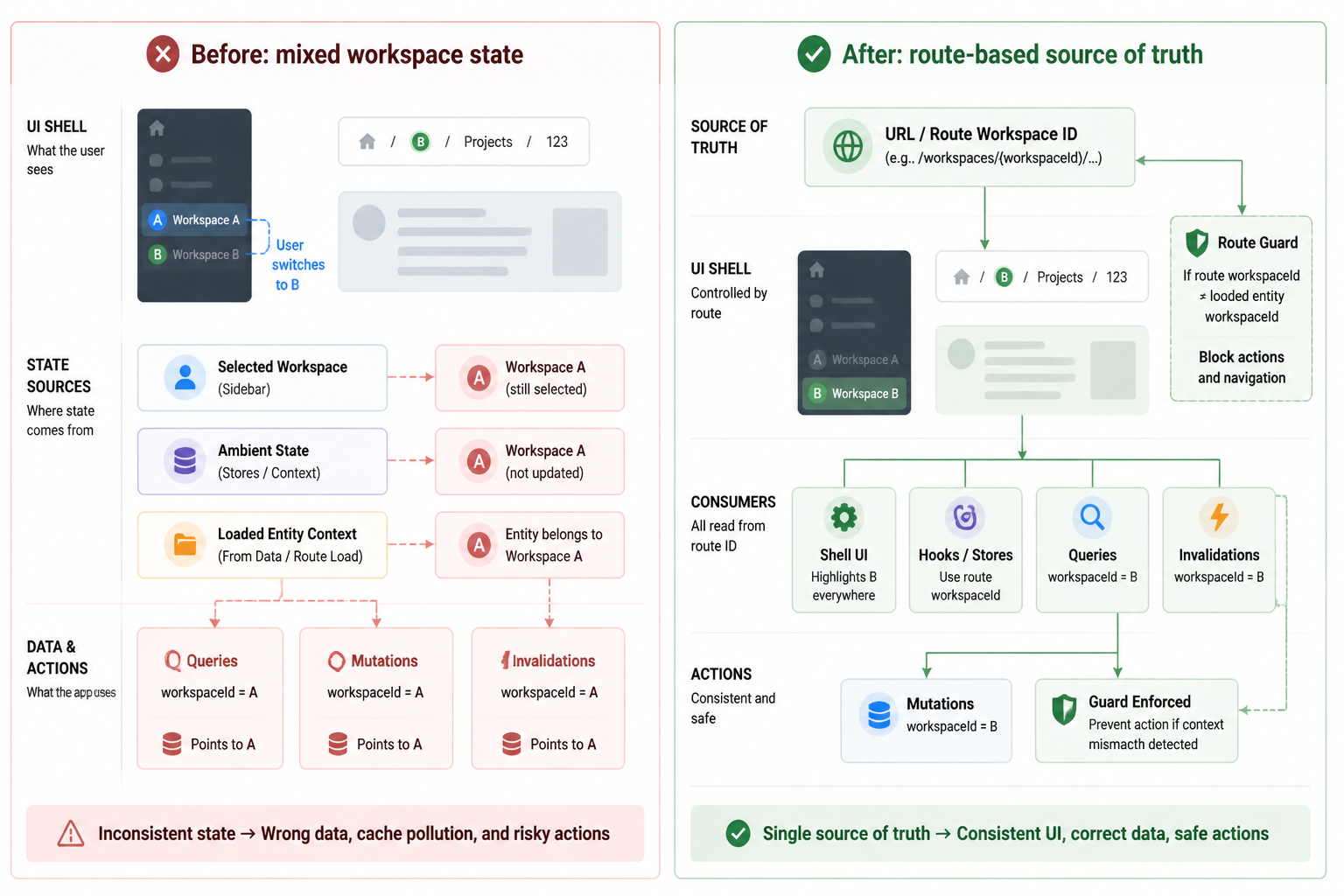
The switcher changed the current workspace in one place, but the rest of the app wasn’t built around a single source of truth yet. Some screens read workspace ID from the route. Some read it from React state. Some pulled it from the last loaded API response. A couple of backend calls still inferred it from session-related defaults. So the new switcher created a split brain state problem.
I could reproduce it pretty easily:
- Open workspace A on a page with cached data
- Switch to workspace B from the sidebar
- See the sidebar and top-level header show B
- Watch one panel still render data from A
- Trigger an action and send it to the wrong workspace context
Nothing crashed, which made it worse. The app looked alive while carrying mixed state.
The first version optimized for visible UI, not app state
The generated code treated the sidebar switcher like a component enhancement. Hot Glue needed it to be a routing and data-loading concern.
At that point the app had a few patterns that had grown separately:
- Route params drove some pages
- Client stores held selected entities for others
- Data fetch hooks cached aggressively
- Mutation handlers assumed current context was already correct
AI didn’t invent that mess. I did, over time, because different screens landed at different points in the project. But AI happily extended it without questioning whether the architecture supported a global workspace switch. It saw a UI control. It implemented a UI control.
Once I saw the mismatch, the fix wasn’t “improve the dropdown.” The fix was deciding what defines active workspace everywhere.
I changed the rule to this: the route is the source of truth for active workspace, and every workspace-sensitive query and action has to derive from it.
That meant rewriting more than the switcher itself. I updated route structure so workspace ID was explicit on the screens that needed it. I removed a few hidden defaults. I changed hooks so they took workspace ID as an argument instead of reading ambient state. I forced queries to invalidate when workspace changed. I also added guards so mutations couldn’t fire if the current route context and loaded entity context disagreed.
That part was slower than generating the feature. It was also the real work.
One bad assumption kept surfacing
The generated implementation assumed that changing selected workspace was equivalent to changing application context. In a small app, maybe it is. In Hot Glue, switching workspace affects permissions, visible records, background jobs, breadcrumbs, deep links, and any in-progress forms that were created under a different context.
I hit one ugly edge case with create forms. A user could start creating something in workspace A, switch to workspace B from the sidebar, then submit the form. The frontend had updated enough of the shell UI to look like B, but the form’s hidden references still pointed at A. That kind of bug doesn’t announce itself loudly. It quietly creates bad records.
So I added another rule: if a form is workspace-bound, switching workspace either resets it or blocks the switch with a warning. I chose reset in a few low-risk places and a confirmation step in the more dangerous flows.
AI didn’t suggest any of that because I hadn’t described the form lifecycle, the route model, or the data ownership rules. Again, local input, local output.
The background job runner had the opposite problem
The sidebar issue was mostly about state consistency. The background job runner was about execution guarantees.
Hot Glue has long-running tasks, especially around sync and processing work that shouldn’t block the request cycle. I wanted AI to scaffold a background runner that could pick up queued jobs, process them, and update job status.
The generated version looked clean. It gave me a jobs table shape, a polling loop, status fields like pending, running, completed, failed, and a worker process that fetched pending jobs and executed handlers. If you looked at the happy path, it was all there.
Then I thought through what would happen once real jobs started overlapping.
The first issue was duplicate execution. The AI-generated worker selected pending jobs and marked them running in separate steps. That creates a race if two workers read the same pending row before either update lands. Even with one worker now, it’s a bad pattern because future scaling turns it into a data integrity problem.
The second issue was retries. The generated code had a failed status, but no clear retry semantics. Would retries be manual? Automatic? Immediate? Delayed? Limited? Safe for non-idempotent jobs? None of that was modeled.
The third issue was crash recovery. If the process died mid-job, those rows could stay in running forever unless I added stale-job reclamation. The generated code didn’t. It assumed the worker stayed alive and the world behaved.
That assumption is fine for a demo. It breaks on the first unexpected restart.
The code answered “how do I run jobs?” but not “what does running mean?”
This was the core mistake. I asked for a job runner implementation before fully defining the lifecycle contract.
I had to step back and define the job model in a way the app could reason about:
- How a job is claimed
- How long a claim lasts
- When a job can be retried
- What counts as safe to run twice
- How progress and failure are recorded
Once I did that, the implementation changed a lot.
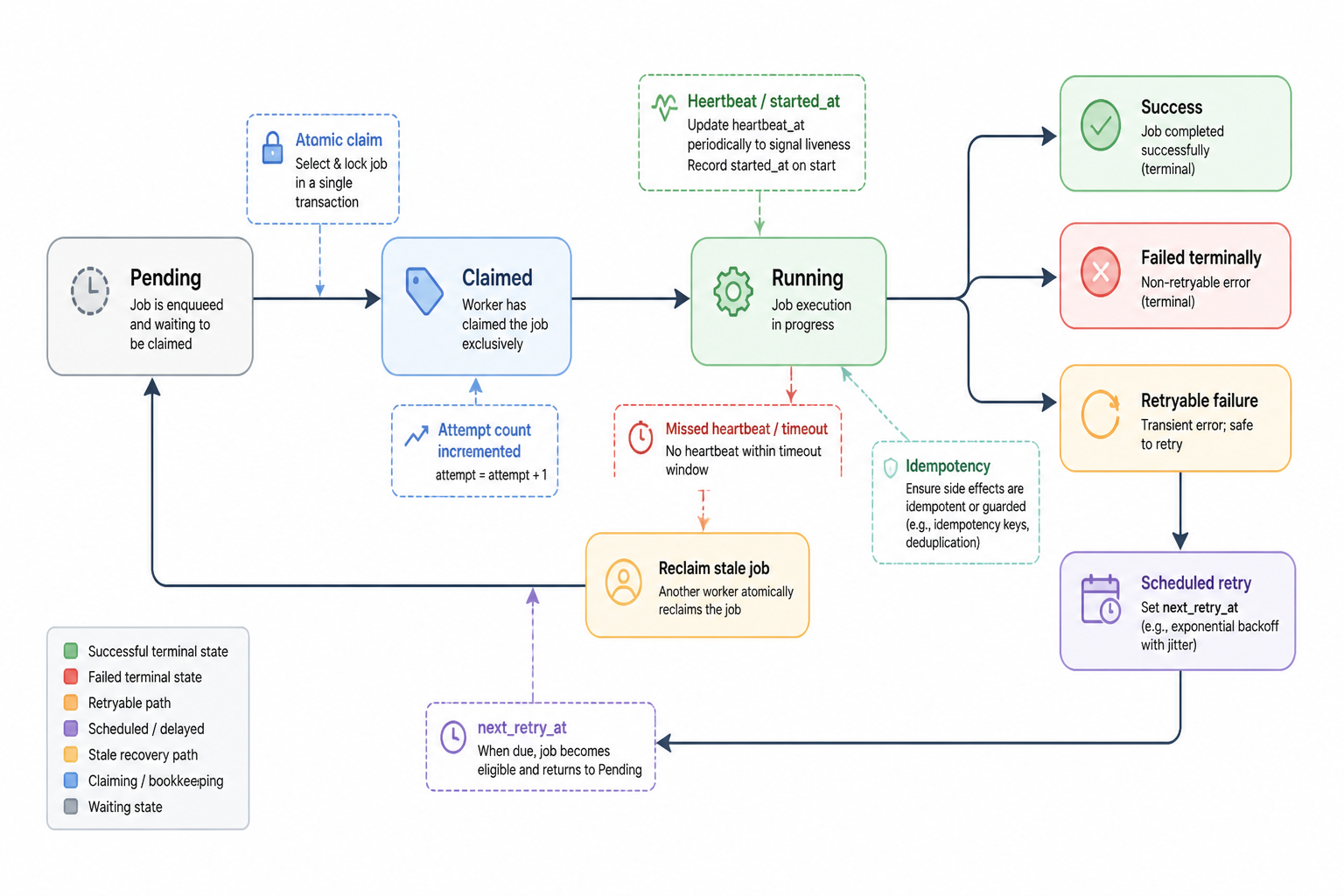
I moved job claiming into an atomic database operation instead of a read-then-update loop. I added attempt counts and next retry timestamps. I split terminal failures from retryable failures. I stored worker heartbeat or started-at metadata so I could reclaim stale running jobs after a timeout. I made handlers return structured results instead of loosely setting status strings in different places.
I also added idempotency checks around the job types that could create or update external records. If a sync job got retried after a network timeout, I didn’t want duplicate side effects because the first attempt maybe succeeded remotely but failed before local acknowledgment.
That was the downstream effect AI missed. A background runner isn’t only a loop. It’s a contract about failure.
The brittle parts showed up where systems met
In both features, the generated code looked weakest at the boundaries.
The sidebar switcher broke where UI state met route state, cached data, and mutation context.
The job runner broke where worker logic met database concurrency, retries, and external side effects.
That’s become one of the more useful heuristics for me when using AI inside MakerWS. If the request crosses a system boundary, I don’t trust a “working” result until I’ve explicitly walked through the effects on every connected layer.
If AI builds the obvious center of the feature, I still need to inspect the edges. The edges are where product reality lives.
What I changed in how I prompt
These two cases changed the way I ask for code.
Before, I might ask for “a workspace switcher” or “a background job processor.” Now I write prompts that force the model to account for state ownership and failure modes.
For the sidebar case, I started asking things like: which layer owns active workspace, what becomes invalid on switch, what needs to be reset, what route changes are required, and where can stale context survive after the switch?
For the job runner, I ask: how is a job claimed atomically, what happens if the worker crashes mid-run, which jobs are idempotent, how are retries scheduled, and how are stuck jobs recovered?
That doesn’t guarantee a perfect answer, but it changes the output a lot. The model starts surfacing missing assumptions instead of quietly filling them in with the simplest possible implementation.
What I changed in the code review step
I also stopped reviewing generated code as if my main question was “does this function work?” That’s too narrow. Now I review against a short downstream effects checklist.
- What state becomes stale if this changes?
- What hidden defaults does this rely on?
- What happens if it runs twice?
- What happens if it stops halfway through?
- Which other screens or jobs assume the old behavior?
If I can’t answer those, the feature isn’t done, no matter how complete the generated code looks.
That review pass catches a lot. It also exposes when the app architecture itself is the real issue. The sidebar switcher problem existed because workspace context had too many partial owners. The job runner problem existed because job lifecycle rules weren’t actually defined yet. AI didn’t create those gaps. It made them visible by building on top of them fast.
One useful way to think about AI-generated features
I don’t think of AI as “building the feature” anymore. I think of it as proposing an initial shape for the feature based on the boundaries I describe.
If I describe a component, it returns a component.
If I describe a process loop, it returns a process loop.
It won’t automatically widen the scope to include everything the change touches. Sometimes it does hint at it, but I don’t depend on that. I have to define the surrounding invariants myself.
That framing has made my MakerWS workflow much better. I still use AI heavily for implementation, refactors, schema suggestions, handler scaffolding, and test generation. But before I ask for code, I try to write down what must remain true after the change. For the sidebar switcher, that was a single workspace source of truth. For the job runner, that was safe claiming, retry behavior, and recoverability.
Once those invariants were explicit, the generated code became much easier to shape and much harder to trust blindly.
The fixes were less flashy than the generated feature
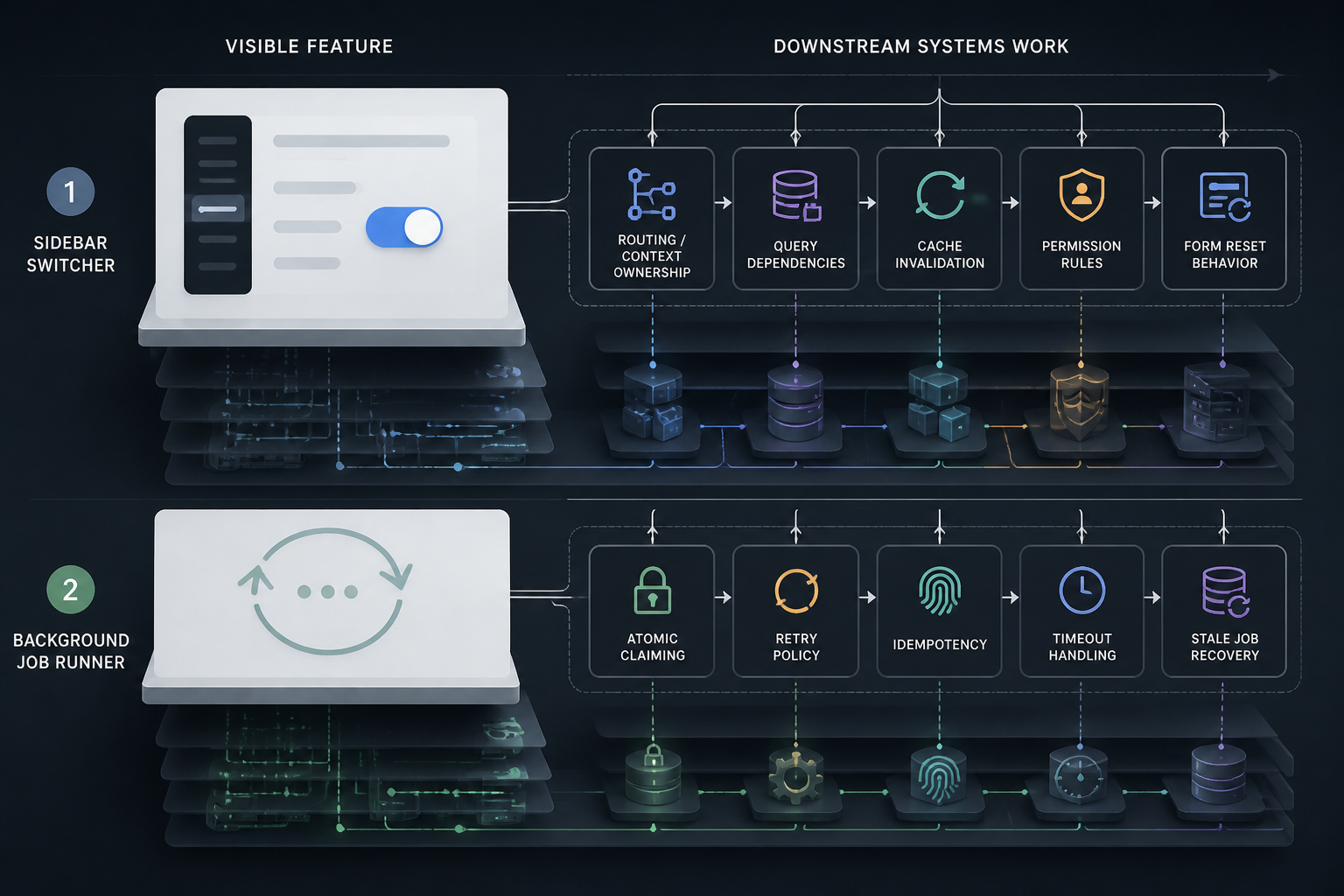
The visible feature in the sidebar was the dropdown. The real fix was route ownership, invalidation rules, and form reset behavior.
The visible feature in the job runner was the worker loop. The real fix was atomic claiming, retry policy, idempotency, and stale job recovery.
That’s another practical lesson I keep running into. AI is very good at producing the parts users can point at in a screenshot or the parts developers can point at in a code snippet. It is much less reliable on the operational guarantees that make those features safe inside a real app.
So when a generated feature looks suspiciously fast to build, I ask a blunt question: did it solve the hard part, or did it only solve the visible part?
Usually the answer is obvious once I trace the downstream effects.
What I’d do first if I were rebuilding these from scratch
For the sidebar switcher, I’d define context ownership before touching UI. I would decide which identifier lives in the route, which queries depend on it, how cache invalidation works, and what in-progress forms do on context change. Then I’d let AI generate the component around those rules.
For the job runner, I’d define the lifecycle as a state machine before generating the worker. I would specify claim semantics, timeout semantics, retry semantics, and idempotency expectations per job type. Then I’d scaffold the runner against that contract.
That order matters. In both cases I originally did it backwards. I generated the visible mechanism first, then discovered I hadn’t pinned down the system behavior underneath it.
The real cost wasn’t bad code. It was false confidence.
Neither feature failed because the code was obviously broken. They failed because the code looked done earlier than it actually was. That’s the expensive part. False confidence shortens the feedback loop in the wrong direction. It makes me think I’m in polish mode when I’m still in architecture mode.
Now when AI gives me a clean first pass on a feature, I treat that as the start of the systems review, not the end of implementation. That shift has saved me more time than trying to perfect prompts upfront.
Hot Glue got both features into a better place, but only after I stopped asking whether the generated code worked and started asking what else had to remain true once it did.