Claude got me from zero to a working SaaS skeleton in one session, but it completely missed the part that usually breaks first
I had a real app scaffolded fast. Auth worked. Billing hooks existed. Database models were in place. The UI had enough structure to feel like a product instead of a demo. That part was impressive.
The failure showed up when I tried to move it from “runs on my machine” to “can survive production.” Environment variables were inconsistent, secret handling was sloppy, background assumptions were hidden in generated code, and deployment behavior wasn’t designed so much as implied. Claude built a strong starting point. It didn’t build production readiness.
That gap matters if you’re using AI inside MakerWS to move quickly, because the first pass can look more complete than it is. I ran into that exact problem with Hot Glue. The first session saved a lot of time, but it also created the kind of confidence that makes production issues expensive later.
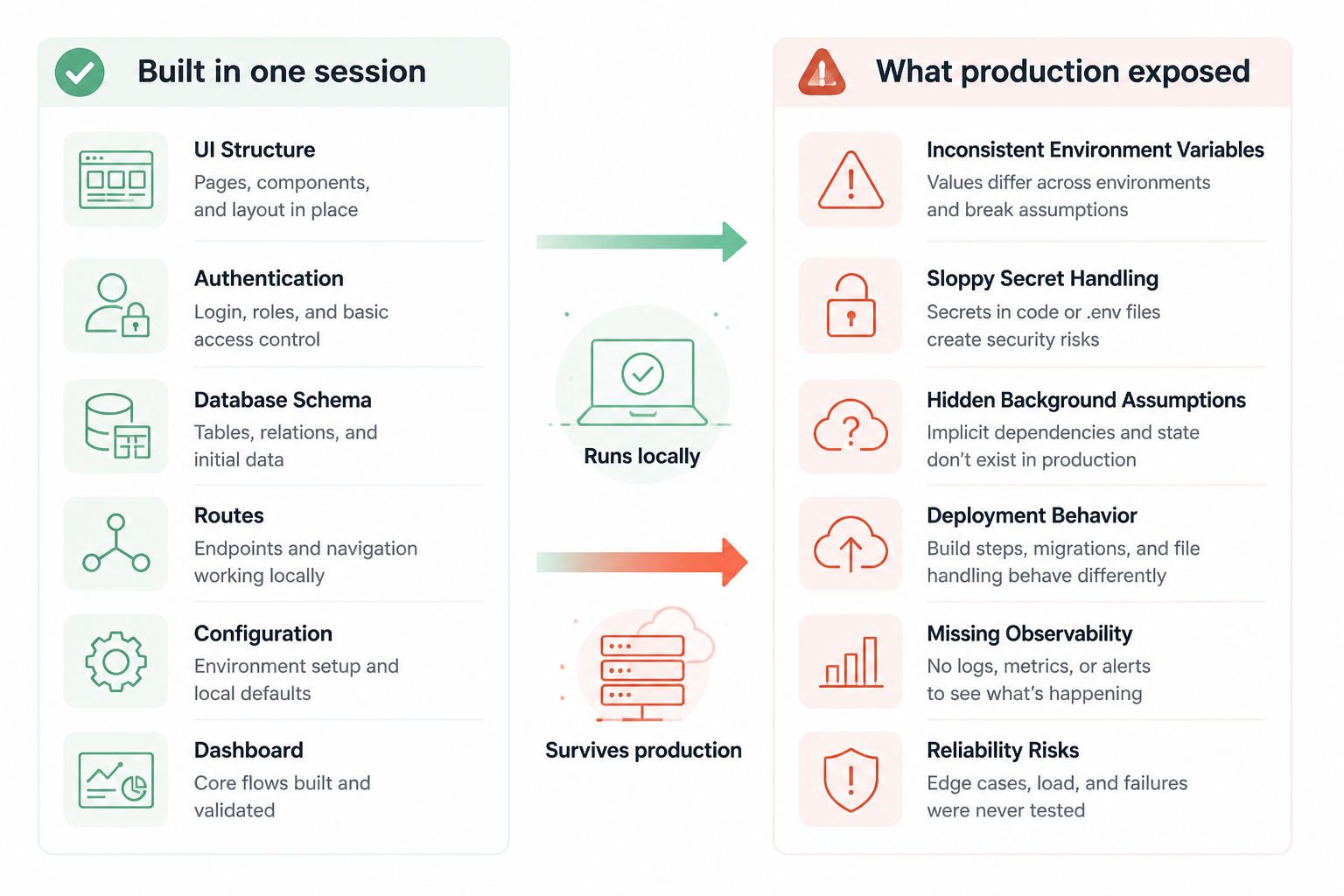
What Claude built in one session
I started with a straightforward prompt inside MakerWS. I asked Claude to create a production-minded SaaS starter for Hot Glue with authentication, user accounts, billing placeholders, a database layer, protected app routes, and a basic dashboard. I also asked it to keep the structure understandable because I knew I’d be changing pieces by hand.
The stack it generated was close to what I wanted: Next.js for the app shell, a relational schema through an ORM, auth wiring, route separation between marketing pages and app pages, and enough config files to make the repo feel settled. It also created environment variable stubs, middleware, API routes, and utility helpers. In one pass, I had a shape I could use.
That speed changed the project. Instead of spending the first day deciding folder names and dependency choices, I could inspect actual code and decide what to keep. That’s a much better use of time. AI is strongest when it turns vague architecture intent into something concrete enough to critique.
But the generated foundation had a specific bias. It was optimized for completeness in code output, not for reliability across environments. That’s a subtle difference until you deploy.
The prompt worked because it asked for structure, not features
The initial prompt wasn’t “build my app.” It was closer to “create the base that a SaaS app usually needs, with clear separation and files I can modify safely.” That worked better than feature-heavy prompting because Claude wasn’t guessing product behavior yet. It was filling in known infrastructure patterns.
I asked for things like:
- app and marketing route separation
- auth and protected layouts
- database models for users, teams, and subscriptions
- environment variable examples
- a README explaining setup assumptions
That gave Claude room to generate a coherent repo. It also made the weak spots easier to spot later, because the assumptions were spread across files instead of buried in one giant app.tsx-style blob.
What looked production-ready but wasn’t
The first warning sign was that local setup felt too smooth. I copied values into a local env file, ran migrations, started the dev server, and things came up quickly. That’s nice, but it can hide bad assumptions. In this case, several pieces were only “working” because my local environment was forgiving.
The generated code treated environment variables as if they’d always exist and always have the right values. In local development, that’s easy to fake. In production, different providers expose env vars at build time, runtime, serverless execution, edge execution, cron contexts, and background workers in different ways. Claude didn’t model those differences. It mostly assumed one flat environment.
It also mixed public and server-only configuration too casually. Some values belonged in browser-safe config. Others absolutely did not. The naming was inconsistent, and a couple helper modules made it too easy to import server assumptions into code that could drift toward the client side later.
None of this was catastrophic on day one. That’s why it’s dangerous. The repo looked clean enough that I could’ve built several more features on top before hitting the wall.
The production env problem showed up in three layers
I ended up splitting the issues into three categories because they kept repeating.
- Missing env validation
- Wrong assumptions about where secrets are available
- Build-time and runtime config getting mixed together
Those sound similar, but they fail in different ways.
1. Missing env validation meant failures happened late
Claude generated an env example file, but it didn’t create a strict validation layer. The app pulled values directly from process.env in multiple places. That meant the app could start with half-broken config and only fail when a specific route or webhook executed.
I don’t want config errors to appear after a customer clicks something. I want them to explode at boot or during deploy. So I replaced the scattered process.env access with a single env module that parsed, validated, and exported typed values. Every required variable had to be declared in one place. Optional values were explicitly optional. Empty strings were treated as invalid where appropriate.
That change wasn’t glamorous, but it made the whole codebase easier to reason about. If a feature needed a secret, it couldn’t quietly reach into the global environment anymore. It had to go through the same gate as everything else.
Before that change, a bad billing secret could sit unnoticed until a webhook hit production. After the change, the app failed fast with a clear message.
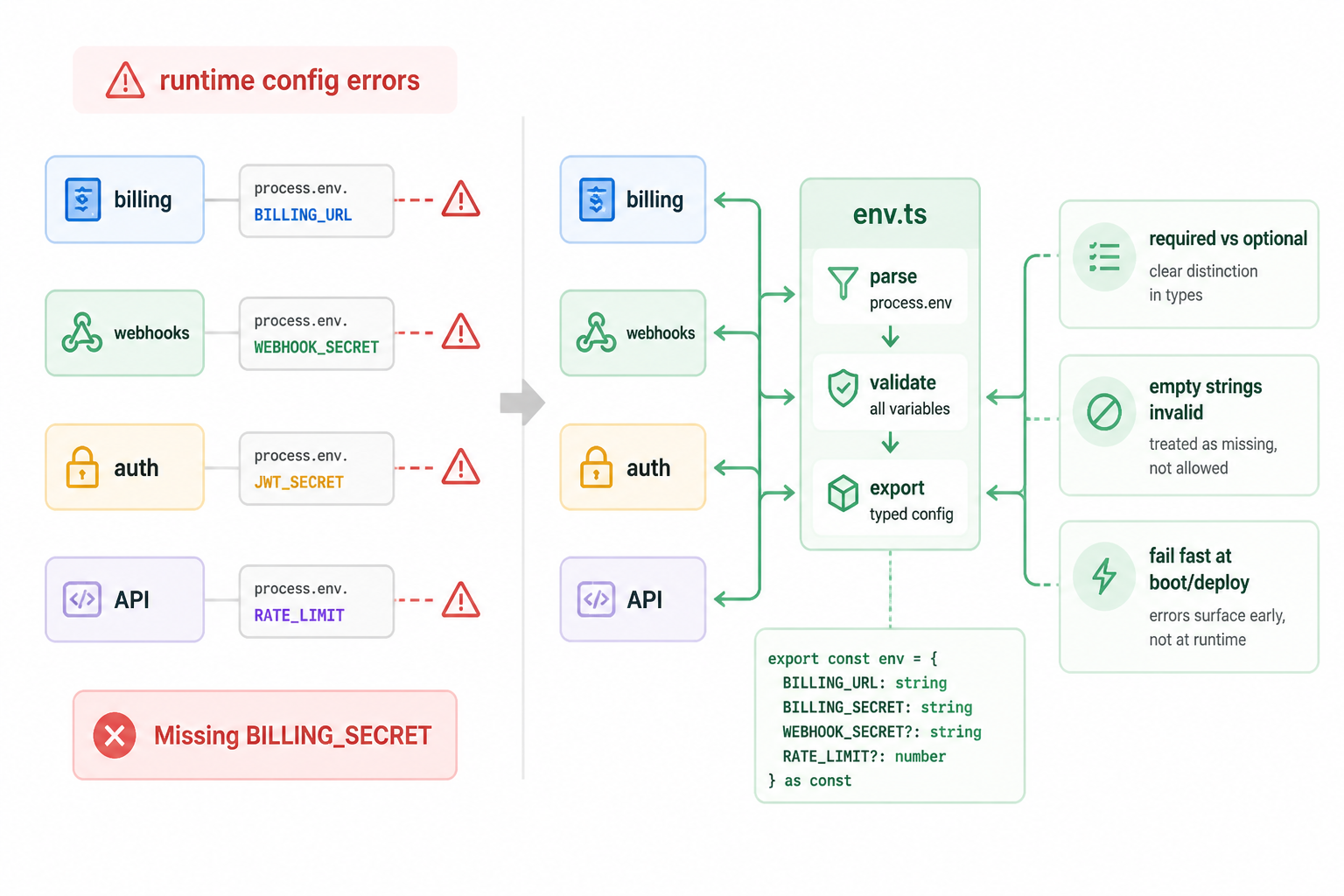
2. Secret scope was fuzzy
Claude understood that some keys should be private, but it didn’t consistently encode that into the structure. A few helper files were written as universal utilities even though they depended on secret-backed services. That’s the kind of thing that survives refactors until someone imports the wrong helper in the wrong place.
I fixed that by making boundaries more annoying on purpose. Secret-backed modules stayed in server-only directories. API clients were split by execution context. Public config got its own tiny file. Server actions and route handlers imported server modules only. Shared utility code lost access to secrets entirely.
That made some imports longer and some code less “clean” in a demo sense. I kept it anyway because production safety is often a little uglier than generated starter code.
3. Build-time and runtime assumptions were mixed together
This was the most subtle issue. Claude generated config patterns that assumed all important values were known in the same phase. That’s not how deployments behave in practice.
Some values need to exist when the app is built. Some only need to exist when the server executes. Some shouldn’t be baked into assets at all. If you blur those together, you’ll get bugs that only show up after a rebuild, a rollback, or a staged deploy.
I had to inspect where values were read:
- module top level during import
- request time inside handlers
- client-side code bundled by the framework
- middleware and edge-like contexts
Several generated files read env vars too early. That made local development look fine while making production behavior harder to predict. I moved those reads closer to runtime where possible, especially for credentials and deployment-specific values.
The generated README was useful, but it lied by omission
Claude wrote setup instructions, which I appreciated, because generated repos are much easier to recover when they document their own assumptions. But the README described the happy path. It didn’t document failure modes, fallback behavior, secret rotation, local-only shortcuts, or deployment prerequisites.
So I rewrote it as an operational document instead of a setup note. I added sections for required env vars, optional env vars, local development differences, database migration flow, and what breaks if a variable is missing or malformed. I also documented which values were safe to expose and which were server-only.
That sounds basic, but it’s where AI-generated repos often drift into trouble. The code may be 80% correct, but the missing 20% lives in assumptions. If those assumptions aren’t documented, future changes get riskier fast.
What Claude got right
I don’t want to overcorrect and pretend the generated foundation wasn’t useful. It was. It saved a large block of setup time and gave me a coherent baseline to work from.
These parts were especially good:
- folder structure that was easy to extend
- reasonable auth flow scaffolding
- database entities that matched common SaaS needs
- route protection patterns I could refine instead of replace
- enough UI shell to make testing real flows possible
That’s the sweet spot for AI-generated application code. It doesn’t need to be production-perfect to be valuable. It needs to reduce blank-page time and expose decisions early.
What I changed by hand after the first session
Once I saw the production gaps, I stopped asking Claude for broad feature additions and started using it for tighter tasks. That change in workflow mattered a lot. Early on, I let it generate large surfaces. After that, I used it more like a code reviewer and targeted refactor partner.
Here are the main manual changes I made.
| Area | Generated behavior | What I changed |
| Env access | Scattered process.env reads | Central validated env module |
| Secret boundaries | Loose helper imports | Server-only modules and stricter file boundaries |
| Runtime assumptions | Values read too early | Moved sensitive reads closer to request/runtime execution |
| Docs | Happy-path setup notes | Operational README with failure cases |
| Deployment | Implied config flow | Explicit checklist for staging and production |
None of those changes made the app more visually impressive. All of them made it safer to keep building.
The biggest lesson was about confidence, not code
The most expensive mistake wasn’t a bad env file. It was trusting the generated completeness too much. Claude produced enough working code that I felt farther along than I really was. That’s a new kind of risk with AI-assisted building. The repo can look mature while its operational model is still shallow.
I now treat the first generated version as architectural clay. If it runs, good. If it reads clearly, even better. But I don’t assume deployability, observability, rollback safety, env hygiene, or secret discipline unless I’ve checked them directly.
AI got me to “working app” fast. It did not get me to “safe to operate” without a separate pass.
How I use Claude differently now inside MakerWS
After this, my prompts changed a lot. I still use Claude for repo scaffolding, but I ask much narrower follow-up questions. Instead of “add billing,” I’ll ask it to audit env usage for billing files only. Instead of “make this production-ready,” I’ll ask it to list every secret, where it’s read, whether it’s build-time or runtime, and which files can access it.
I also ask for output in forms that are easier to verify. Diffs. File-by-file plans. Assumption tables. Failure-mode checklists. Those formats are less flashy than a big generated feature, but they reduce the chance that I accept hidden mistakes because the code looks polished.
One prompt pattern worked especially well: I pasted the env module and relevant handlers, then asked Claude to identify unsafe imports, timing issues around config reads, and code paths that would fail only after deployment. That’s a much better use of the model than asking it to vaguely “review for production.”
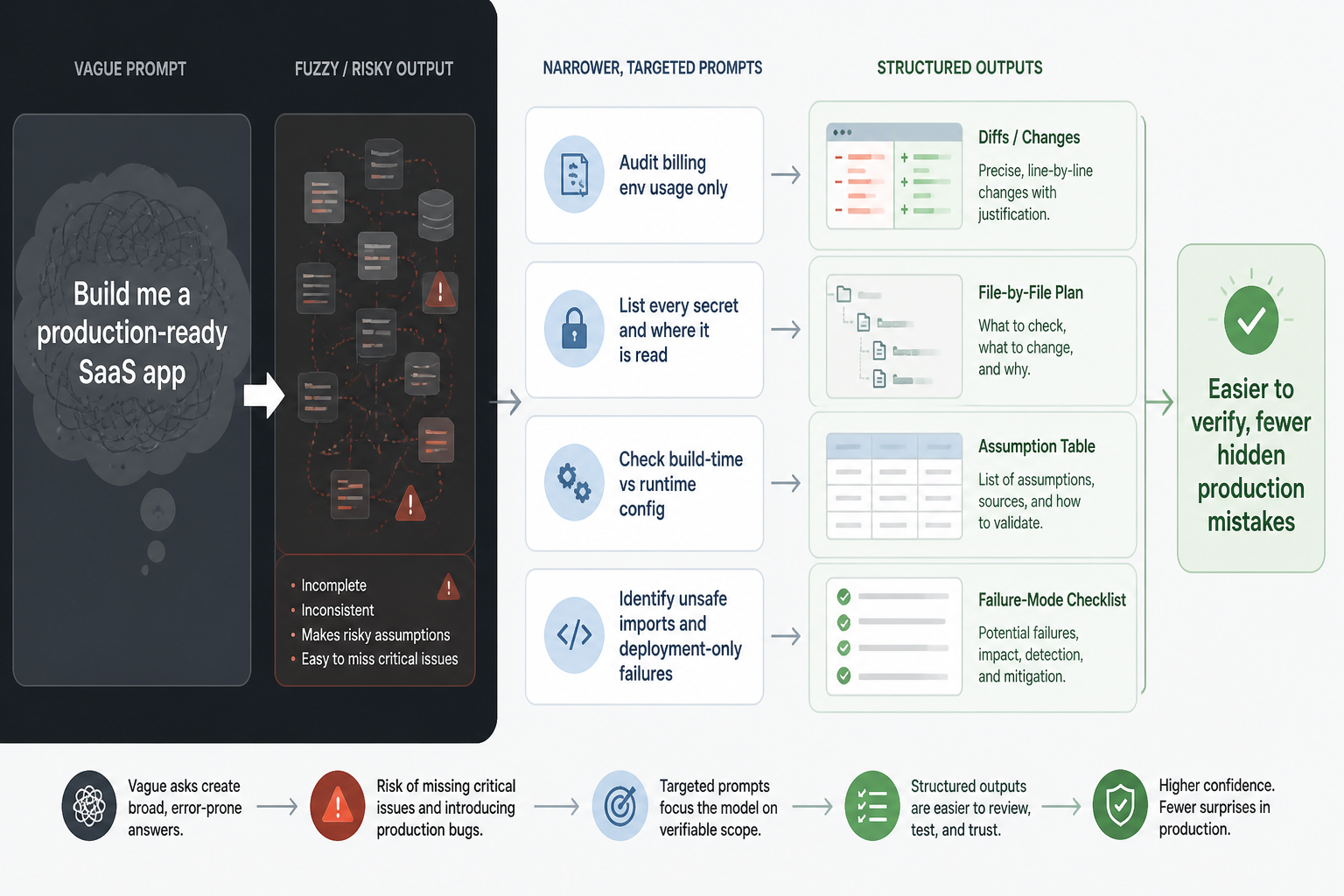
What I wish the first session had included
If I were rerunning the whole setup for Hot Glue, I’d ask for a stricter foundation from the start.
- a typed env validation file created on day one
- a table of every required secret and where it’s consumed
- explicit separation between public config and server config
- deployment notes for build-time versus runtime values
- a “what will break in production” section in the README
Those requests sound less exciting than “build me a SaaS app,” but they’re closer to what actually matters after the first week.
Why this matters for Hot Glue specifically
Hot Glue isn’t a static content site. It needs accounts, user state, protected actions, external service credentials, and reliable environment handling across development and deployment. That means production concerns aren’t optional cleanup. They’re part of the product surface.
When AI scaffolding gets those concerns partly right, it creates a tricky middle state. You’re not starting from scratch, which is great. But you’re also not looking at a trustworthy production foundation yet, which means every new feature can inherit bad assumptions.
That’s what happened here. The first session gave me momentum. The cleanup pass gave me something I could safely keep extending.
My current rule for AI-generated foundations
I separate “can build on this” from “can deploy this” as early as possible.
If Claude gives me a usable foundation in one session, I count that as a win. Then I immediately run a production audit before adding much else. I check env validation, secret boundaries, runtime timing, deployment assumptions, migration safety, and docs. If those aren’t clean, feature work waits.
That rule came directly out of this Hot Glue setup. It wasn’t obvious at the start, because the generated code looked finished enough to trust. It wasn’t. It was a very good draft.
The honest summary
Claude built a credible SaaS foundation for Hot Glue in one session. That saved time and gave me a real starting point. It also missed the production environment problems that decide whether a foundation is actually safe to use.
I still want that first session. I want it every time. But now I know what it is: accelerated scaffolding, not operational design. Once I treated it that way, the workflow got much better. Claude handled the broad initial structure. I handled the production truth. Then I used Claude again in smaller, more verifiable passes to close the gaps.
That trade-off has been worth it. The speed is real. So are the misses.