Why I used bananas to test the app
I used bananas as test data because they broke my assumptions faster than anything else. The app was supposed to handle simple item records with a name, a price, a status, and a few tags. I started with fake SaaS-ish data, which looked clean and behaved clean. Then I switched the seed script to generate bananas in different states, like green, ripe, bruised, frozen, and “forgotten in backpack,” and a bunch of edge cases showed up immediately.
The first problem was naming. I thought a name field with a uniqueness constraint would be enough. It wasn’t. “Banana” is not unique in any useful system, and trying to make it unique pushed me toward nonsense values like banana-17. So I split the model into a human label and a stable ID. In the database that became display_name and slug, with the slug generated in application code and checked again at the database layer because race conditions made duplicate slugs possible during bulk import.
The stack was pretty ordinary: Postgres, a Node API, and a React frontend. The weird part was the data. That helped because boring stacks hide fewer variables. When something failed, I knew it was probably the schema, the query, or the state model, not some fancy infrastructure choice.
My first migration for the bananas table looked fine on paper:
id,name,status,price,created_at
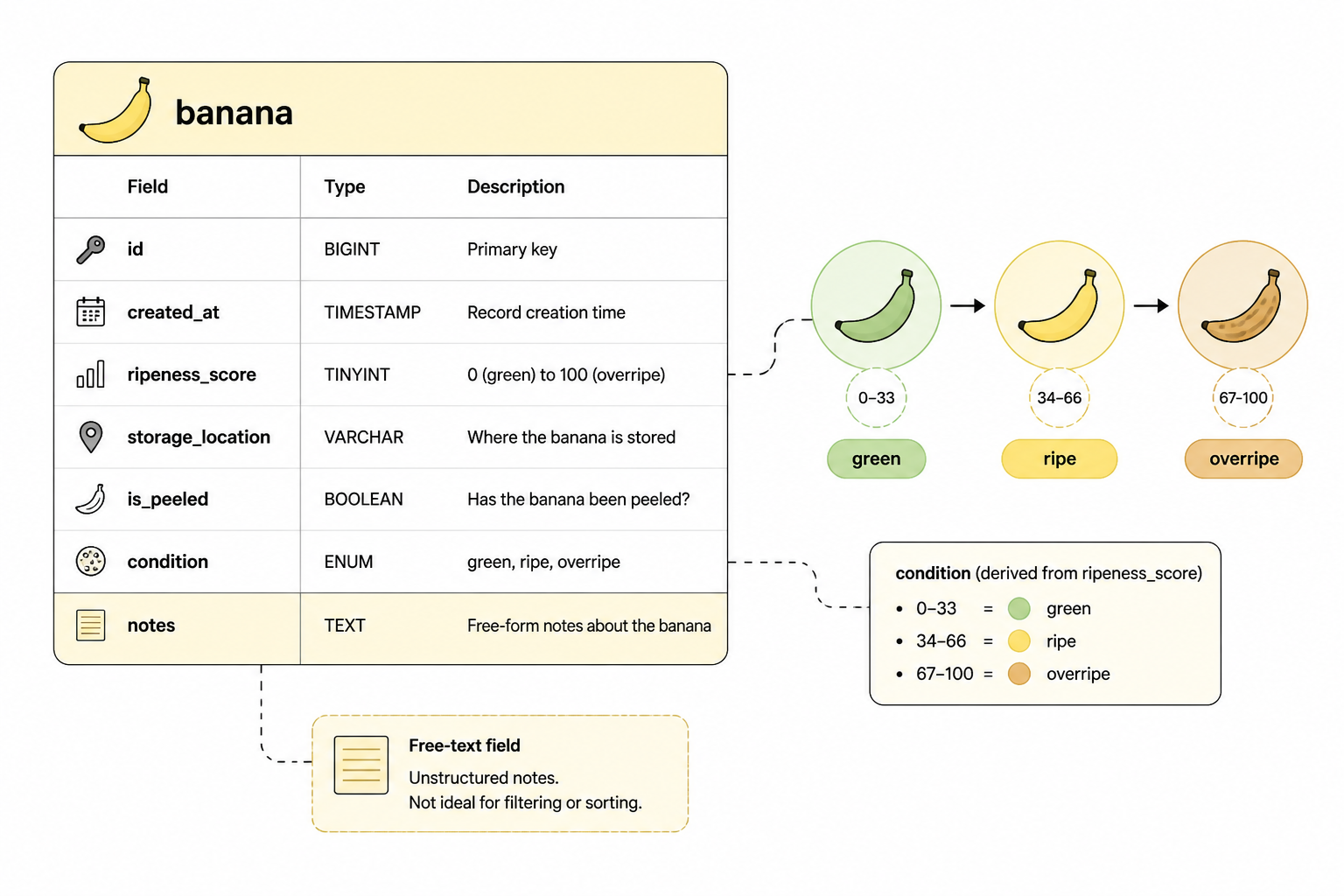
It lasted about a day. I added ripeness_score because the UI needed sorting that wasn’t alphabetical. Then I added notes because statuses alone didn’t capture enough detail. Then I hit the classic mistake of storing too much in free text and not enough in structured fields. A note like “half peeled, left on desk” is useful for a person but terrible for filters.
So I changed the shape again. I kept notes, but I added explicit columns for the things I kept querying on: storage_location, is_peeled, and condition. That made the write path a little more annoying and the read path much simpler, which was the right trade-off because reads outnumbered writes by a lot in this app.
The seed script that exposed bad assumptions
I keep a seed file around for every project because handcrafted demo data lies. In this case the seed script lived in scripts/seed-bananas.ts. It created batches of records with uneven distributions on purpose. Most bananas were ripe. A few were green. Some had missing prices. Some had duplicate display names. One had a negative discount because I wanted to see whether the API would reject it or quietly store garbage.
The API quietly stored garbage.
That failure was useful. I had validation in the frontend form, but the import endpoint bypassed most of it because I was trying to keep the uploader flexible. That turned into a mess fast. The fix was to move validation into a shared schema and run it in both places. I used Zod for that, not because it’s magical, but because it let me define the shape once and keep the errors readable. The important part wasn’t the library. It was deciding that the backend owned validity and the frontend only helped users get there faster.
Once I pushed validation down into the API, I could trust the data enough to simplify the UI. Before that, every table cell needed fallback behavior because any field might be null, empty, malformed, or technically valid but useless. Afterward, null still existed, but it meant something specific.
Sorting bananas is harder than it sounds
The table looked easy. Show bananas, sort by ripeness, filter by status, maybe search by name. Then I tried to define what “sort by ripeness” meant. If one banana had ripeness_score = 8 and another was marked condition = rotten, which one comes first? A numeric sort didn’t match how people thought about the list. A status sort didn’t capture the gradual states in the middle.
I ended up with two fields because one field couldn’t do both jobs cleanly. ripeness_score stayed numeric from 0 to 10. condition became an enum with values like green, ripe, bruised, overripe, and rotten. The main table sort used a CASE expression in SQL so the rough category came first and the score broke ties inside the category. That query wasn’t pretty, but it matched the way the UI needed to behave.
I tried to keep it “clean” with one field. That was the wrong goal. The right goal was making the data match the questions the product actually asked.
I also learned that text search on banana names was mostly pointless. Everyone typed “banana.” The useful search terms were things like “freezer” or “desk” or “bruised.” So I changed the search endpoint to weight storage_location and notes higher than display_name. That looked odd until I watched people use it. Then it made sense.
The frontend state got ugly before I fixed it
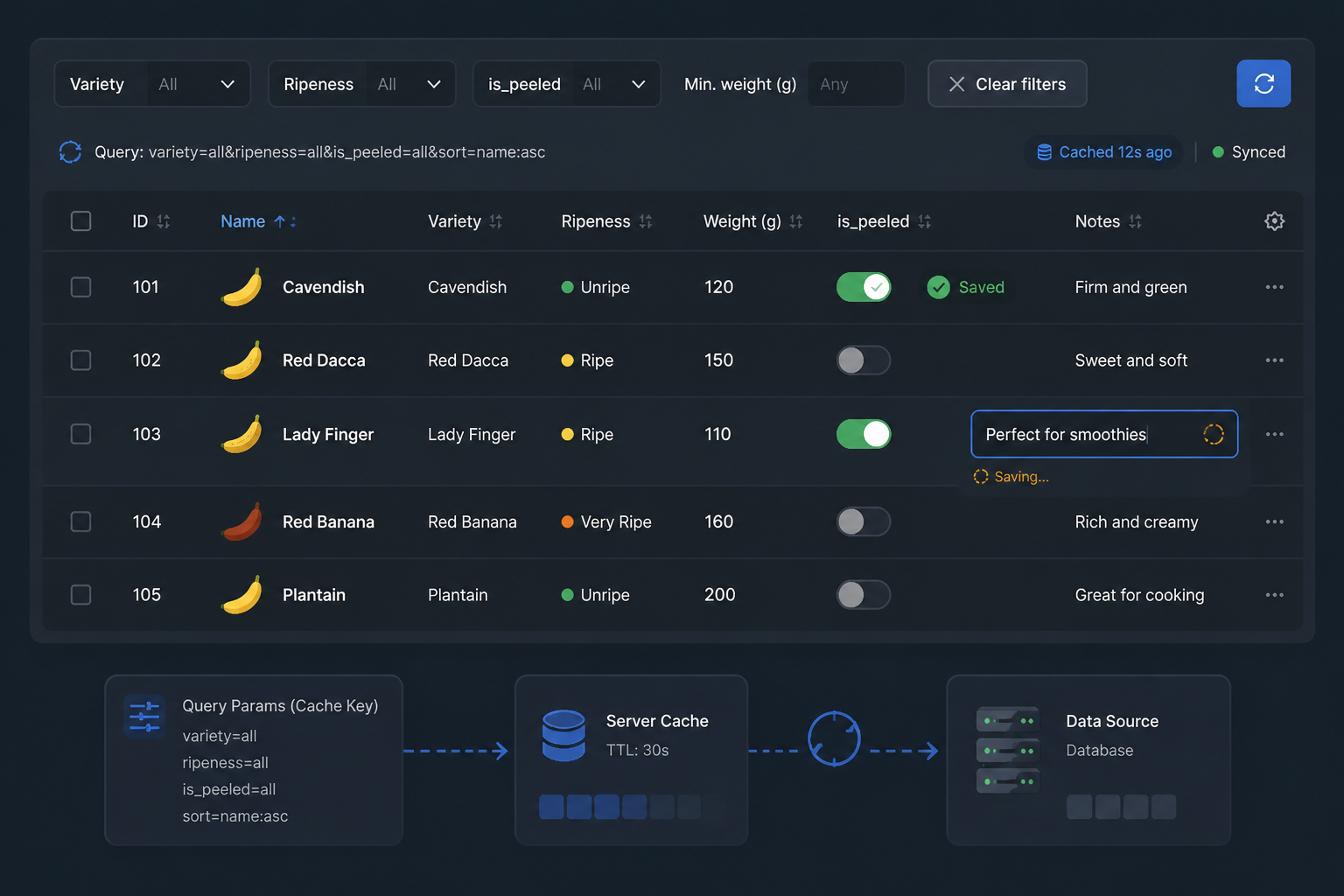
I started with local React state in the table view. That was fine until inline edits, filters, optimistic updates, and bulk actions all landed in the same week. At that point I had derived state stacked on top of derived state, and stale rows started showing up after edits. The worst bug was a banana moving to the wrong filter group after an optimistic update because the local cache mutated one field and forgot another.
The fix wasn’t exotic. I moved server state into TanStack Query and stopped pretending table rows were local state. Filters still lived in the component tree, but row data came from queries keyed by filter and sort params. Inline edits wrote through a mutation, then invalidated the relevant query keys. I considered doing full optimistic updates, but the list ordering logic was too dependent on the backend sort rules, so I only used optimistic UI for simple field toggles like is_peeled. Everything else waited for the server response.
That made the interface feel slightly less snappy in a few cases, but it stopped whole classes of bugs. I prefer a small delay over a table that lies.
Importing CSVs was where the real mess showed up
The banana CSV importer was supposed to be a convenience feature. It turned into the hardest part of the build. CSV files look simple until people upload real ones. Headers vary. Empty cells mean different things. Boolean values arrive as TRUE, true, yes, Y, or an empty string that someone swears means false.
I wrote the importer in two stages. First, parse the file into a raw row shape. Second, map raw rows into validated domain objects. Keeping those separate saved me when I had to support multiple header aliases. It let me accept both ripeness and ripeness_score without muddying the actual banana model.
The mapping file ended up being more important than the parser. In lib/import/bananaMapper.ts, I defined explicit transforms for each field. Prices were parsed as decimal strings and normalized before insert. Booleans were matched against a whitelist. Empty strings became null for some fields and stayed empty for others. That sounds tedious because it is tedious, but it beats chasing weird values through the app later.
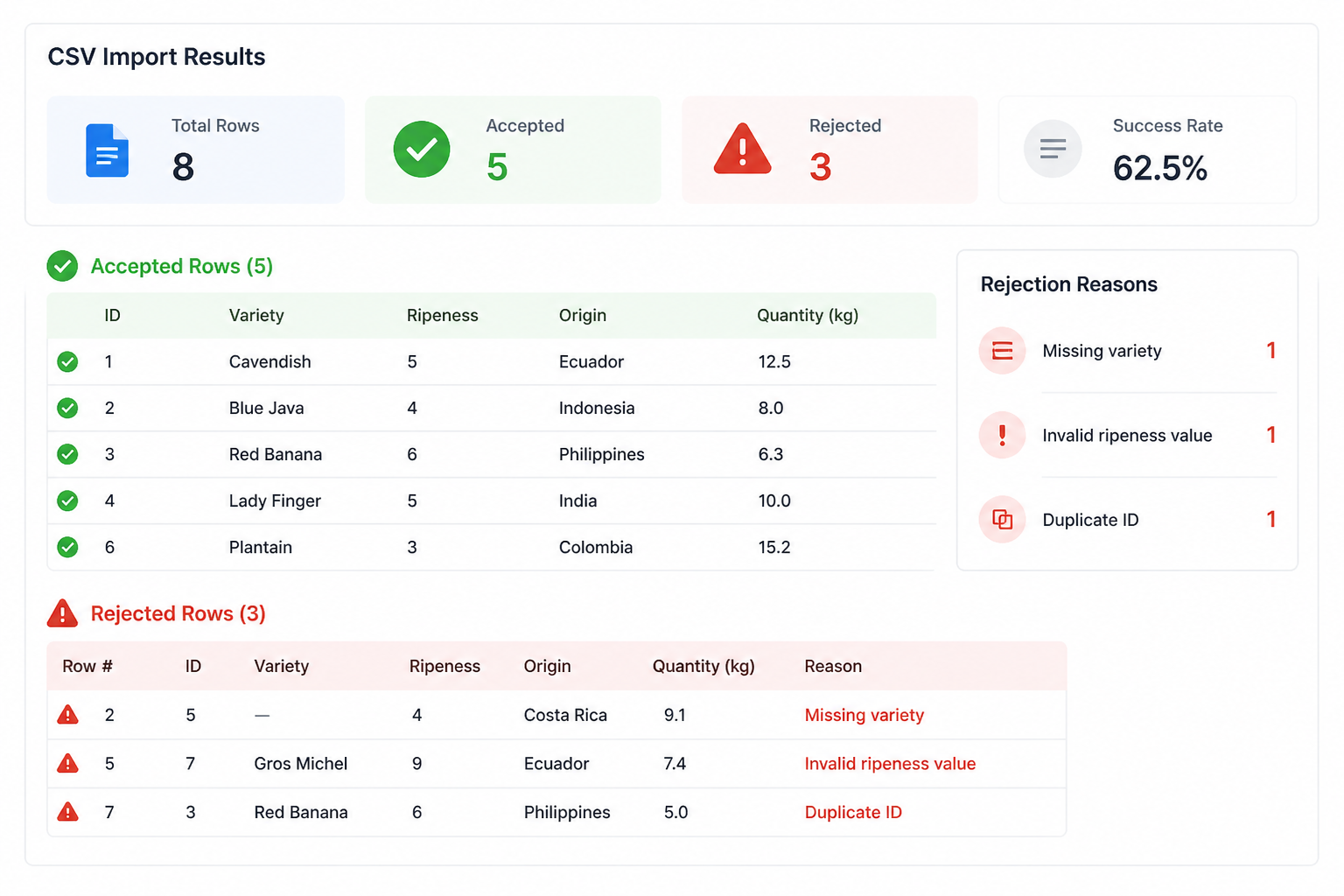
I also chose to reject rows individually instead of failing the whole file. That’s a compromise. It means partial imports, which can surprise users, but it also means one bad banana doesn’t block 499 good ones. The UI shows a row-by-row error report after upload, and the API returns accepted and rejected counts in the same response so the frontend can present a useful summary.
| Problem | First attempt | What I changed |
|---|---|---|
| Duplicate names | Unique name constraint | Separate display_name and slug |
| Ripeness sorting | Single text status field | Enum condition plus numeric ripeness_score |
| CSV booleans | Trust parser output | Explicit field transforms in mapper |
| Inline edits | Local component state | TanStack Query for server state |
| Validation | Frontend only | Shared schema enforced by API |
What bananas taught me about naming things
The word “banana” showed up everywhere, which was funny for about ten minutes and then started hiding bad names. I had functions like getBananaStatus, normalizeBanana, and bananaSort. Those names told me nothing. Once the project got more complex, I had to rename a lot of code to describe behavior instead of subject matter.
normalizeBanana became mapImportRowToBananaInput. Longer, yes, but now I know exactly what it does. getBananaStatus split into computeConditionLabel and isEditableState because it had been doing two unrelated jobs. The banana theme made it obvious when I was naming code lazily, which turned out to be useful.
I hit the same issue in the database. A column called status kept drifting in meaning. Did it describe ripeness, inventory state, or workflow state? I replaced it with narrower fields. That made the schema bigger, but also more honest. Short names feel nice during the first migration. Precise names help six weeks later when you no longer remember what “status” was supposed to mean.
Performance didn’t matter until the table hit a few thousand rows
I didn’t start with pagination because the early dataset was tiny. Then the seed script and imports pushed the table high enough that client-side sorting and filtering became noticeably bad. Not catastrophic, but annoying enough that I stopped ignoring it.
Server-side pagination was the obvious fix, but it changed more than the API. Bulk selection across pages got weird. Filter counts became expensive if calculated live on every request. The frontend needed to know whether “select all” meant all rows on the page or all rows matching the current filter. Those are product decisions wrapped in implementation details.
I chose cursor-based pagination because inserts happened often enough that offset pagination would produce annoying jumps. The cursor was based on created_at plus id as a tie-breaker. For sorting modes that couldn’t use that cursor naturally, I limited pagination options instead of pretending every combination was equally cheap. That was another compromise. The UI exposed fewer sort modes on very large datasets, which was better than timing out and acting surprised.
For filter counts, I stopped computing every count on every request. The sidebar only loaded counts for the current filter family, and some totals updated lazily after mutations. Not perfect. Good enough. The app stayed responsive, which mattered more than keeping every badge numerically exact every second.
The part I’d do differently
I should’ve modeled workflow state earlier. Ripeness and condition describe the banana itself. They don’t describe what the system is doing with it. I ended up adding fields later for things like review_state and archived_at, because a bruised banana and a flagged banana are different concepts. Merging those into one field created bad UI logic and bad filters.
I also waited too long to add fixture-based tests around the importer. Unit tests for small parsing helpers passed while the full import flow still broke on realistic files. Once I added a fixtures/imports/ directory with nasty CSV samples, bugs got easier to reproduce and fix. If I were starting again, I’d write those files on day one and keep adding to them whenever an import failed in